Magento Conversion Rate Optimization For Boosting Beauty Brand Sales

Product pages in the beauty eCommerce play a huge role in determining your conversion rates. That’s why if you are looking to leverage the conversion rate, it is necessary to focus on these pages. That is why an optimized product page makes a great cornerstone of your online sales strategy. It can make or break a potential customer’s decision to complete a purchase.

Key Takeaways:

● Product pages matter when it comes to conversion success.

● Optimizing images, descriptions, and reviews improves customer engagement.

● Clear CTAs and mobile-first designs improve the checkout experience.

● A/B testing takes one through continuous improvement.

● Knowing what your customer needs is the key to effective optimization.

To ensure your product pages are effectively optimized, consider utilizing Magento development services. By working with professional Magento developers, you can create product pages that not only attract but also convert potential customers.

Knowing Your Customer is Half the Battle

Magento conversion rate optimization should always start with understanding the needs, preferences, and shopping behaviour of your target audience. This will ensure that each element of the product page is aligned with the expectations of customers, providing a more personalized and engaging shopping experience that drives conversions.

Optimizing Product Images

Picture Perfect: How Stunning Visuals Drive Sales

Everything in the beauty industry comes down to visual appeal. High-quality product images aren’t a nice-to-have, they are a must-have for capturing attention and driving sales. Ensuring those images are clear, well-shot, and representative of what’s inside that bottle, pack, or jar can impact conversion rates hugely.

Several Angles and Close-Ups

Multiple angles, close-up shots, and videos showing the demonstration of the product make it easier for the customers to have a better understanding of what they are buying. The inclusion of such detailed photos makes them more trustworthy to buyers and reduces the possibility of returns since buyers know what to expect.

Let Your Customers Be Your Salespeople: The Power of User-Generated Content

ugc example

UGC, be it in the form of customer photos or videos, can work as social proof and become very effective in building trust and authenticity. It makes your brand relatable by including real-life images taken by customers who are in love with your products, hence motivating new customers to make a purchase.

Crafting Compelling Product Descriptions

Clear Communication: The Secret of Conversion

The descriptions of clear, concise, and informative product details can help turn browsers into buyers. Your description should focus on what the product can do, whom it is for, and why yours stands out from others. Avoid using jargon with simple language so that your message is communicated to all.

Focus on Benefits, Not Just Features

While your products’ features is important, going directly to benefits will help you win most of your arguments. Be sure that it explains how the product is going to solve a problem or improve life for the customer in some tangible way. It gives a reason for the product to be more attractive and more relevant to the needs of the buyer.

SEO and Sales: A Winning Combination

Adding relevant keywords to the product descriptions will not only help in search engine ranking but also make them discoverable for many potential customers. However, use these keywords naturally to avoid keyword stuffing, as this will turn away shoppers and negatively affect SEO.

Leveraging Customer Reviews

ecommerce review

Social Proof: The Ultimate Trust Builder

Customer reviews act as social proof this assures prospective buyers of the quality and effectiveness of your products. Positive reviews will significantly impact conversion due to the amount of trust and credibility they can infuse into an audience.

Encourage Reviews: Make it Easy for Customers to Share Their Experiences

Incentivize your buyers to review you. Make the process of reviewing easy, and offer them incentives like discounts on their next purchases to increase the number of reviews on your site.

Respond and Engage: Turn Critics into Advocates

Not all reviews will be positive, but it is the response that makes all the difference. Quick and professional responses to negative reviews prove that you care about customer feedback and are devoted to improvement. This attitude can easily shift dissatisfied customers into loyal advocates.

Designing for Conversion

A Clear Path to Purchase: The Importance of a Strong CTA

An effective, artfully placed call to action is what will drive a customer to complete a purchase. Make sure your call to action pops on the page and indicates the next step to take in completing a purchase.

Recommended Products: Increase Average Order Value

Increase average order value with recommendations for complementary products or bundle deals. These should, at strategically recommended times during the checkout Magento process and on the product page itself, encourage customers to put more items into their shopping cart.

Build Trust: The Role of Badges and Seals

trust badges example

Add trust badges, such as secure payment seals and a money-back guarantee, to help alleviate any concern over the safety and reliability of your site. This is going to give real estate on product pages and during Magento one-step checkout, providing reassurance to customers and reducing cart abandonment.

Mobile-First: Optimize for the Way People Shop

With the increasing trend of consumers shopping on their mobile devices, the design for your product pages and checkout must be mobile-first. You want to make sure your site is responsive and very fast with a smooth shopping experience on all devices.

A/B Testing for Continuous Improvement

Finding Opportunities for Growth: Identifying Areas to Improve

You want to keep your conversion rates high, which means continuous improvement is integral to this. Using A/B testing will give you the flexibility to experiment with various components on your product pages to determine what works for your audience. That could be anything from headlines and CTAs to more nuanced components: Testing will show you what customers prefer.

Data-Driven Decisions: Analyzing Results and Making Changes

This should be known from A/B testing and then applied to make insight-driven decisions regarding the optimization of your product pages. Analyze the results to know which changes made the greatest difference in conversions, then apply these learnings elsewhere on your site.

Conclusion

From enhancing the visuals to creating descriptive copies that sell and making the most of customer reviews, the list of how to optimize product pages in Magento continues. If you’re concentrating on Magento conversion rate optimization and tweaking it over and over again to make your way, you will create a selling experience that drives sales and builds customer loyalty.

Checkout is a very critical stage in the customer journey, and its optimization may yield higher conversion rates. A frictionless, user-friendly Magento checkout page will motivate customers to complete a purchase. Development or integration of Magento checkout, or enhancing the already existent Magento checkout process, can help prevent the abandonment of shopping carts and facilitate smooth transitions from shopping to payment. In addition, clear visibility of various payment options and an order summary can further improve the customer experience.

Page load speed can make or break a sale. Slow product pages or checkout processes will, without a doubt, lead to cart abandonment by customers. Ensure that your Magento site is as optimized as possible by compressing images, leveraging caching, and using a content delivery network to quickly get pages to users. A fast-loading site improves not only user experience but also positively affects your search engine ranking, which means increased traffic and higher conversions.

Speed Up Magento 2 Store in 10 Steps

With the rapid change in the evolution of technologies, online shopping has become a preferred medium for every buyer. Today, our market is filled with some of the Best Ecommerce CMSs , such as Magento, WooCommerce, Shopify, Opencart, BigCommerce, etc. However, Magento 2 is considered as one of the most extensively used eCommerce platforms in the world. Every new ecommerce store and startups opt for Magento 2 as their base platform. Did you know, 65% of B2B organizations have an e-commerce site to launch at the end of one year and Magento occupies the share of 1.4% of CMS in the market in 2020

The way that Magento 2 is structured is quite mesmerizing in its own way, because it saves cost and time it takes to develop an ecommerce store. Although, it does have the knock-on effects of slow speed and increased loading time if Magento 2 store is not setup correctly. Almost every eCommerce owner dilutes each sinew to reduce page loading time. Although, ensuring stable and constant website performance remains the most challenging task in Magento 2 website. 

Here, we are going to share the main reasons that make your Magento 2 slow, and how you can speed up your Magento 2 Store. 

But for that, you need to understand “What is Magento 2?” and “Why is your Magento 2 store responding slow?”

Scroll Down!!

So, What is Magento? 

“Magento is an open source ecommerce CMS platform.” 

Let’s break it down! 

  • Open source is a software where original code is released under a license, it is made freely available where it can be altered, enhanced, and modified according to developers’ needs.
  • Ecommerce is a software that allows business transactions to be conducted electronically. It is an application used to sell services and products online. 
  • CMS stands for Content Management System, It’s an application that is being used to handle all content related to products and services in one central location. 

Thus, Magento is an Open Source Ecommerce Content Management System. 

Why is Magento 2 so slow? 

By default, Magento 2 speed is not slow, the default store is pretty smooth and robust. High loading time in Magento 2 store causes lack of knowledge in optimizing the website and the misconduct. If the basic requirements such as usage of inappropriate third extensions, not enabling the right plugins, disabled full page cache, etc. can cause slowing of speed in your Magento 2 store. Thus, Magento is not slow but when you see the increase in loading speed of your store, that’s the time when you should start optimizing your site to reduce the loading speed and make your store more astonishing and smooth to use. 

Any site depends on, if the delay time to start the page is more than expected, you can lose a bunch of potential customers due to slow speed. 

So, how will you speed up the Magento site of your own? 

Here, we present to you some of the most useful ways that will help you revamp your Magento site performance to its best. 

Ways to speed up Magento 2 store

#1 Choose a Local Web Server 

Magento is quite a powerful store, thus hosting your Magento store on a dedicated server is required instead of shared hosting for Magento. 

While building servers, the default settings to host the server is usually in the US. Having a server so far away is going to result in an increased delay on your server, because the information has to bounce forwards and backward overseas. Thus, if you are based in a different country, you should use the server of your country itself. 

If you don’t have the server available in your country, get one that is closest to you or you can turn to a different provider. 

Using a server of your own country can speed up the Magento 2 store performance. Thus, your website visitors won’t have to wait for your site to wait for more. 

#2 Enable All Magento Caches 

There are various practices that need to be performed to speed up Magento site including cache. 


Here is the step-by-step guide that will help you enable every single Magento store cache in order to improve the Magento 2 loading speed. 

How will you enable all Magento 2 Cache?

Follow the trail of steps:

Step 1: Head to

System -> Cache Management 

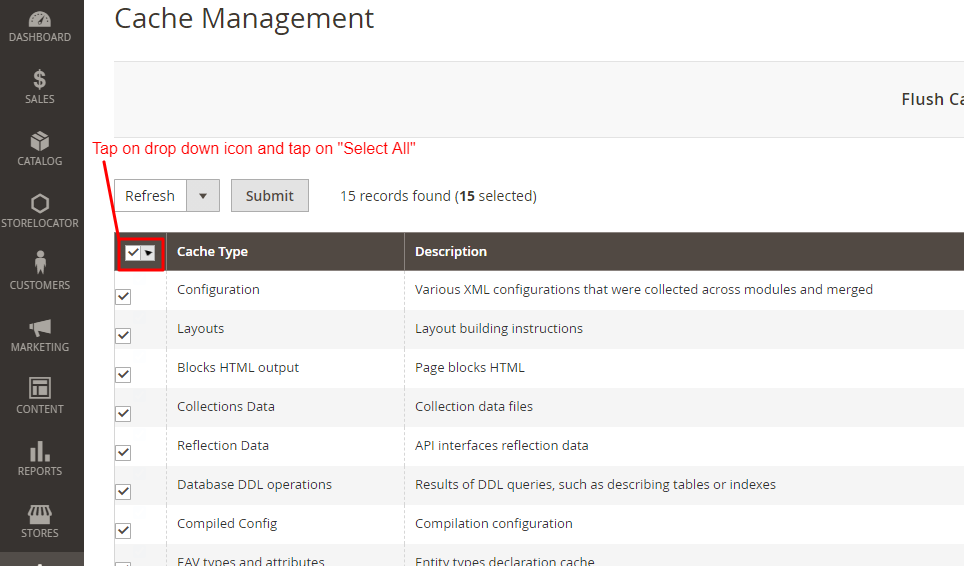
Step 2: Here, You will have to tap on “select all” cache types in order to enable all. 

Cache Management

Step 3: Tap on drop down and select “Enable”.

Cache Management

Step 4: And Hit “Submit”

Cache Management

When all cache types are enabled, you’ll start to notice that pages you visit will be cached into the system. So, the second time you visit, the page will load faster. 

Note: Apply for both front end and back end. 

#3 Enable Flat Catalog Category and Product

Enabling flat category and product is a form of database caching, which will result in faster loading of information on the front end of your Magento 2 website. It gets almost all necessary attributes from various tables into your store database, and merges them into one easily accessible file. Here, you can choose which attributes will get merged into your flat catalog by adjusting your categories and products. 

To Enable flat category and product follow these steps: 

Step 1: Head to

Store-> Configuration

Step 2: In “Configuration” section, open Catalog and again open the Catalog option inside it. 

Configuration

Step 3: Open “Storefront” option in Catalog section

Catalog

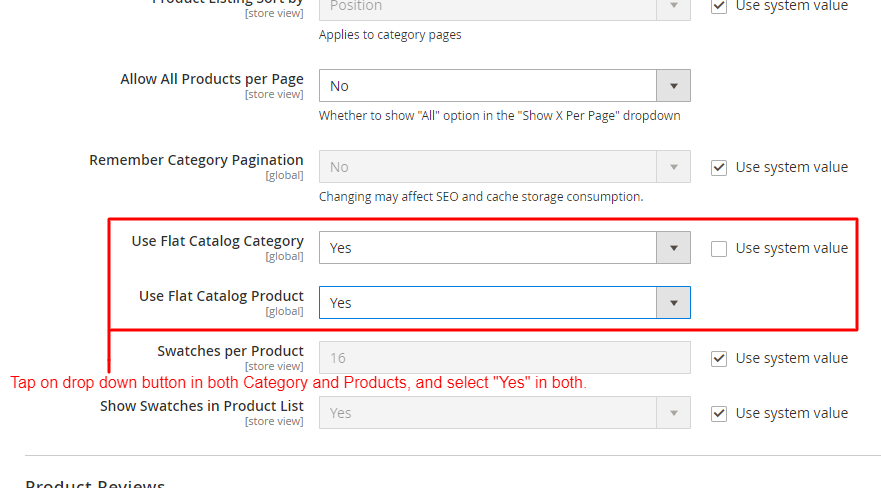
Step 4: In Storefront, scroll down to “Use Flat Catalog Category” & “Use Flat Catalog Product”. If it is not enabled, then turn them to “Yes” in both categories. 

Catalog

Step 5: Once both catalog category and product is in enable mode. Go to “Store” again and tap on “Product”.

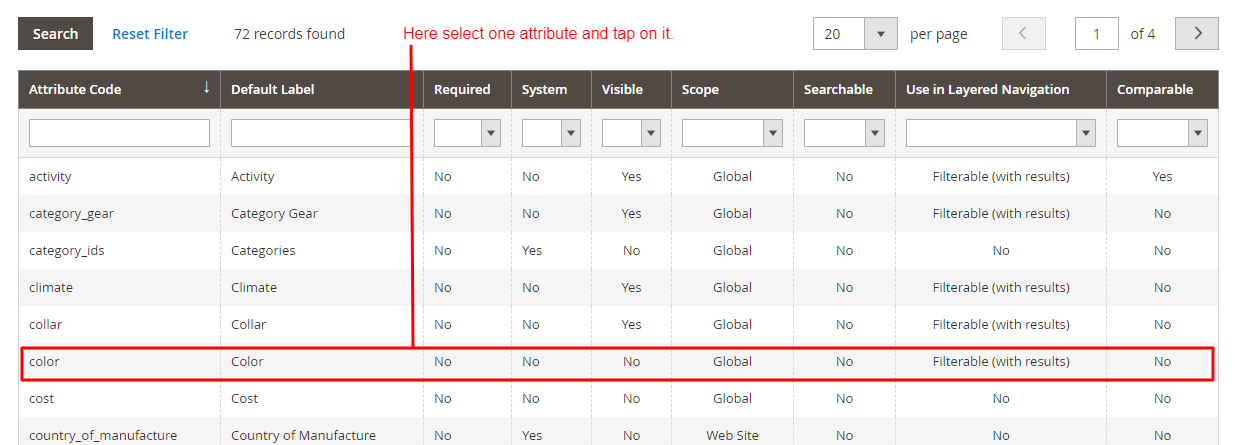
Step 6: Once you open the “Product” category, you’ll have to select one attribute. Here, we choose the “Color” attribute. 

Attribute Code

Step 7: In the “Attribute information” section, open “Storefront properties”

Attribute Information

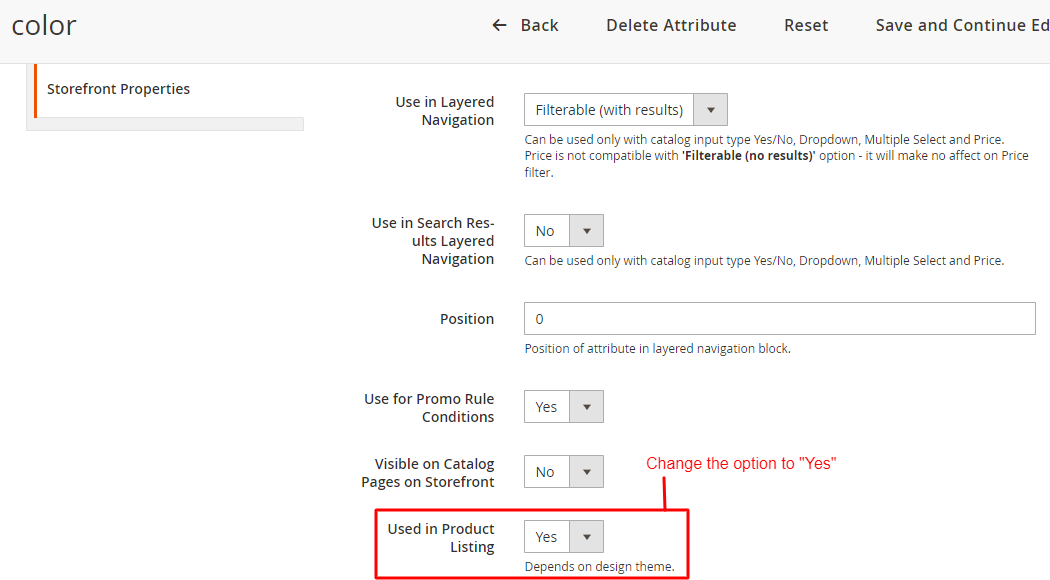
Step 8: In “Storefront Properties”, Scroll to “Used in Product Listing” and enable it. 

Color

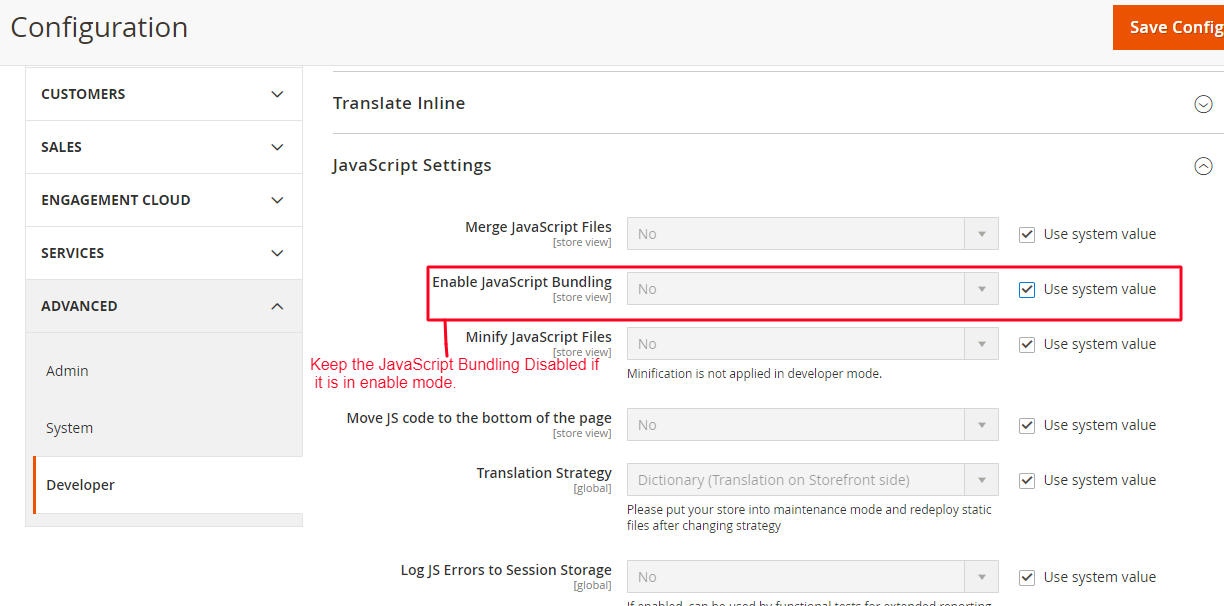
#4 Disable JavaScript Bundling 

Purpose of the setting is to optimize Magento 2 site speed by bundling groups of JavaScript files together, this will limit the number of requests that a web browser has to make to the server.

However, micromanaging what files are bundles can be quite difficult. This can result in a buggy experience on the front end and all the JavaScript files can result in being larger than they need to be. 

Remember to keep your JavaScript Enable.

Step 1: Head to 

Store-> Configuration

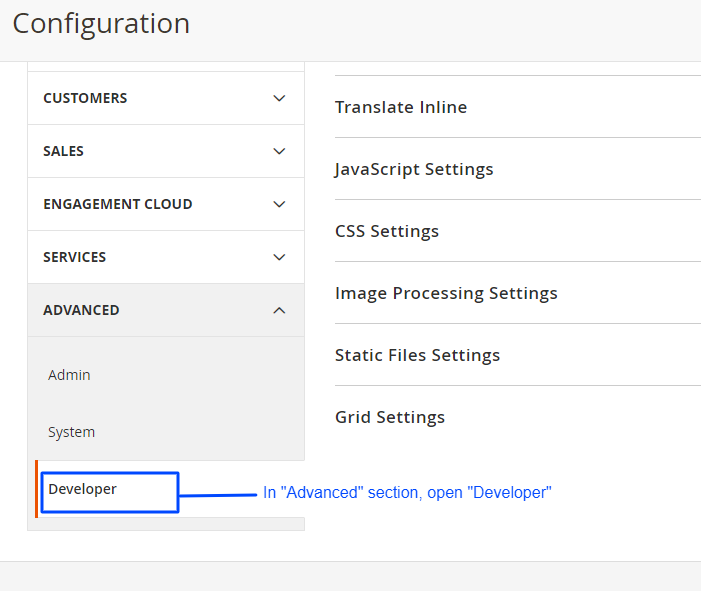
Step 2: In the Configuration section, scroll down to the “Advanced” tab on the left panel, and in that, open “Developer” section.

Configuration

Step 3: In the Developer section, open “JavaScript Settings” and go to “Enable JavaScript Bundling” option. You have to keep it disabled the entire time. 

Configuration Advance

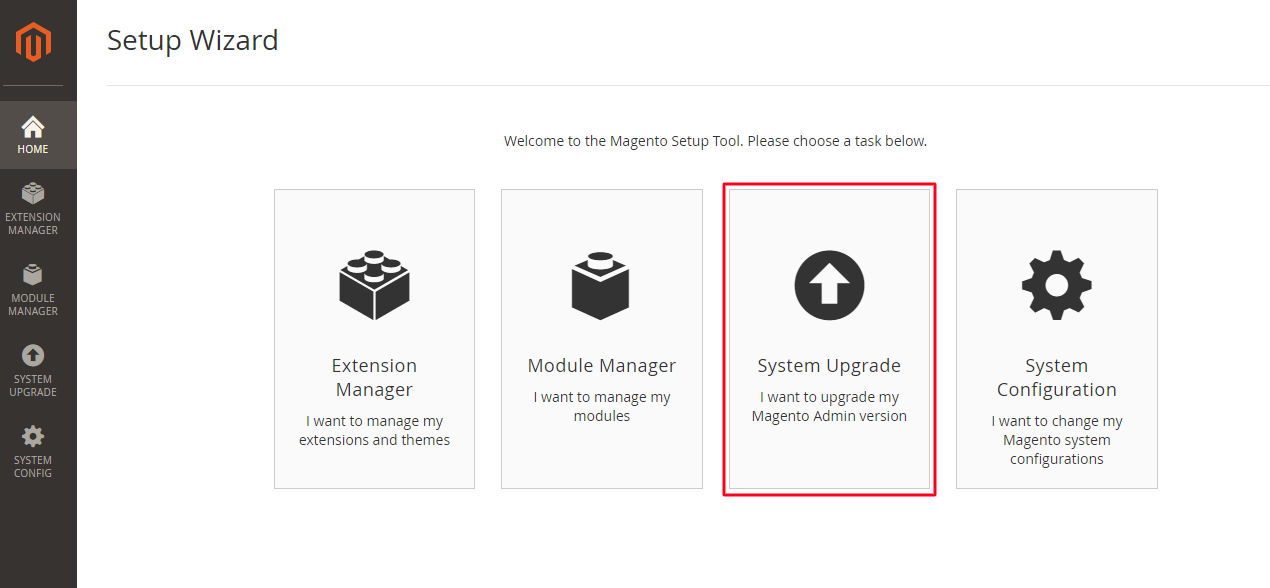
#5 Keep up with Magneto Updates

Things like old-bugs and optimization opportunities gets in highlight with the release of more patches of updates. With the release of more patches, For that you will have to keep your Magento website functionality updated. Want to know how to check it?

Step 1: Head to 

System-> Web Setup Wizard

Step 2: In Web Setup Wizard, Update your Magento store by tapping on “System Upgrade”

Web Setup Wizard

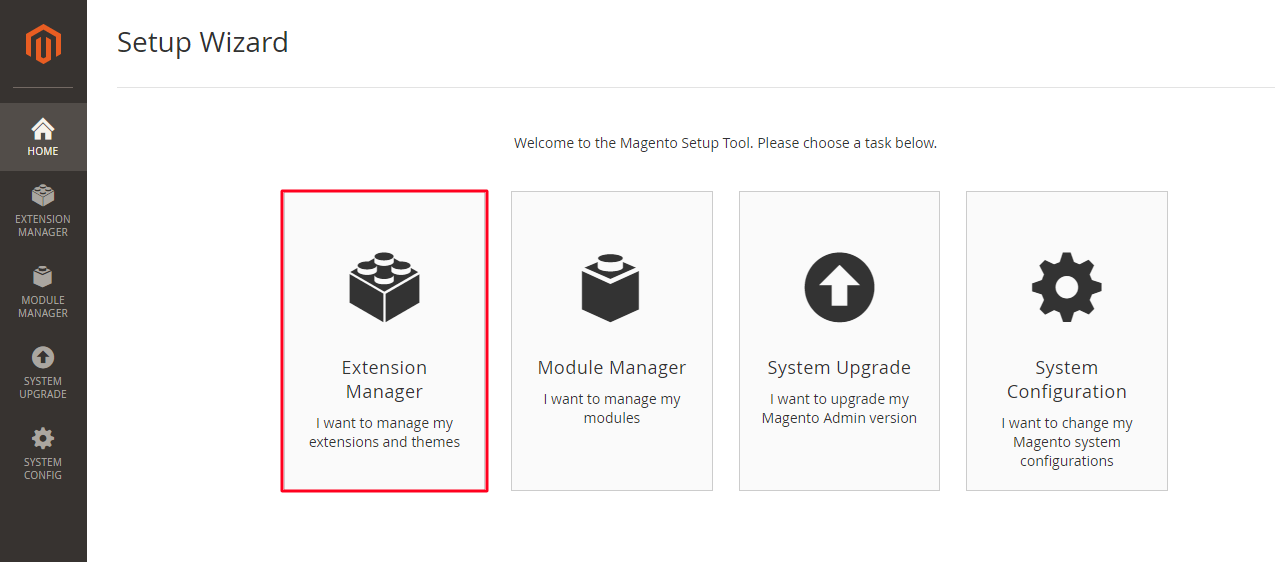
#6 Keep 3rd Party Extensions Updated

Not updating 3rd party Magento 2 extensions can cause many problems with your Magento 2 website functionality. Thus, keeping it updated can help you enhance your Magento 2 site speed. 

To update 3rd party extensions in your Magento 2 store, follow these steps:

Step 1: Head to 

System -> Web Setup Wizard

Step 2: Select “Extension Management”.

Setup Wizard

Step 3: Action -> Update

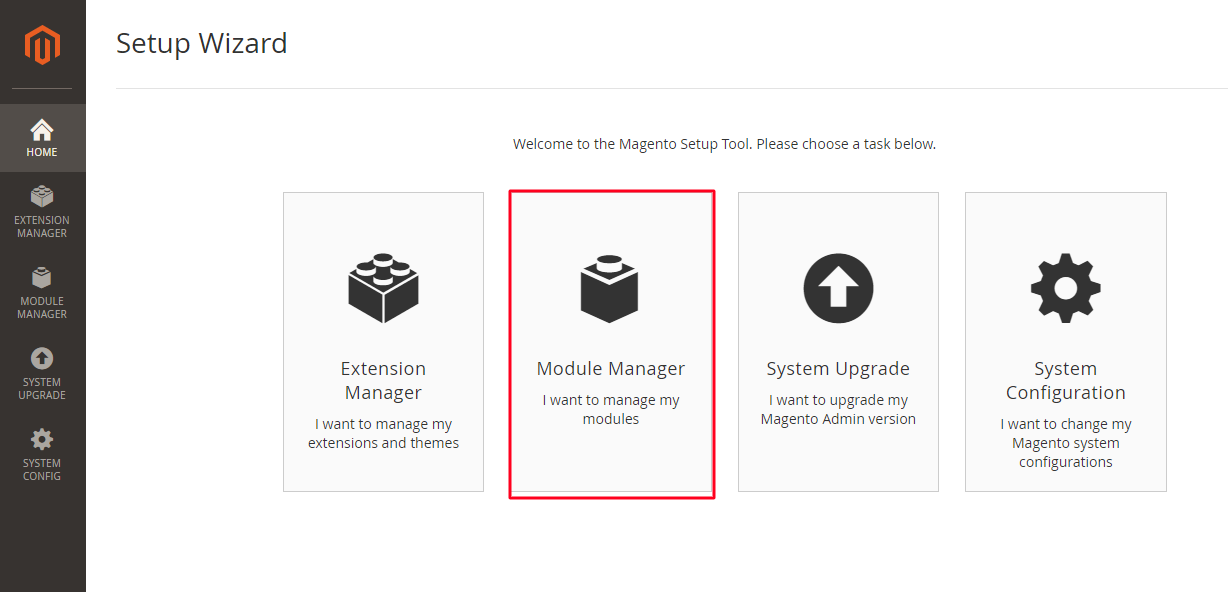
#7 Remove Unused Magento 2 Extension 

With the time, your website will grow, and then the time will come when you’ll realise that some of the extensions are not the best-fit where some of them will forfeit their functionality. That is the time when you have to remove those unused Magento 2 Extension.

Step 1: Head to, 

System -> Web Setup Wizard 

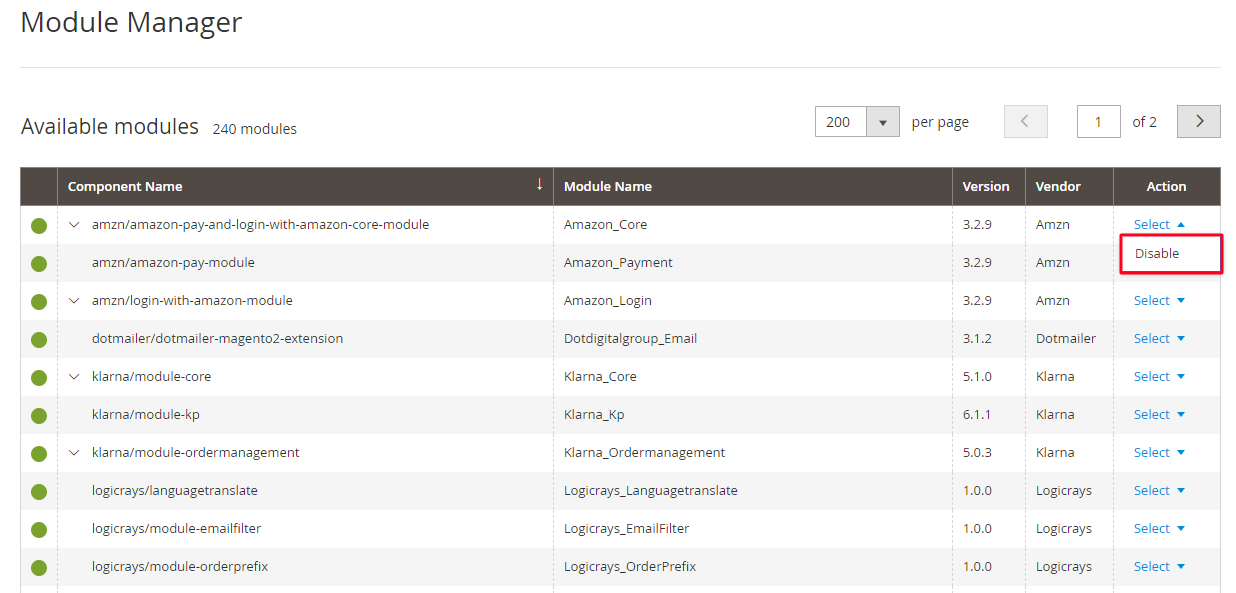
Step 2: In Web Setup Wizard, tap on “Module Manager” 

Setup Wizard

Step 3: Go to the Module Manager and there you’ll see each and every module of Magento. With every module, there is an Action button from where you can disable the module that is not important for you. 

Module Manager

#8 Schedule Indexing

There are good amount of chances that your indexes modes will be set to update on save. This will work best if you have a few hundred products on your website, but if you have a few thousand products, then you might find your Magento store a little sluggish after you make changes to your categories and products. 


In your Magento 2 store, it is much more efficient to change the modes to update by schedule. By this, you can schedule indexing to take place on various intervals during the day, which also helps reduce bottlenecking. The only downside you’ll face will be; until the index takes place ,your changes will now display on the front end until the index has taken place. 

Now, how to schedule indexing? 

Follow these steps:

Step 1: Head to 

System-> Index Management

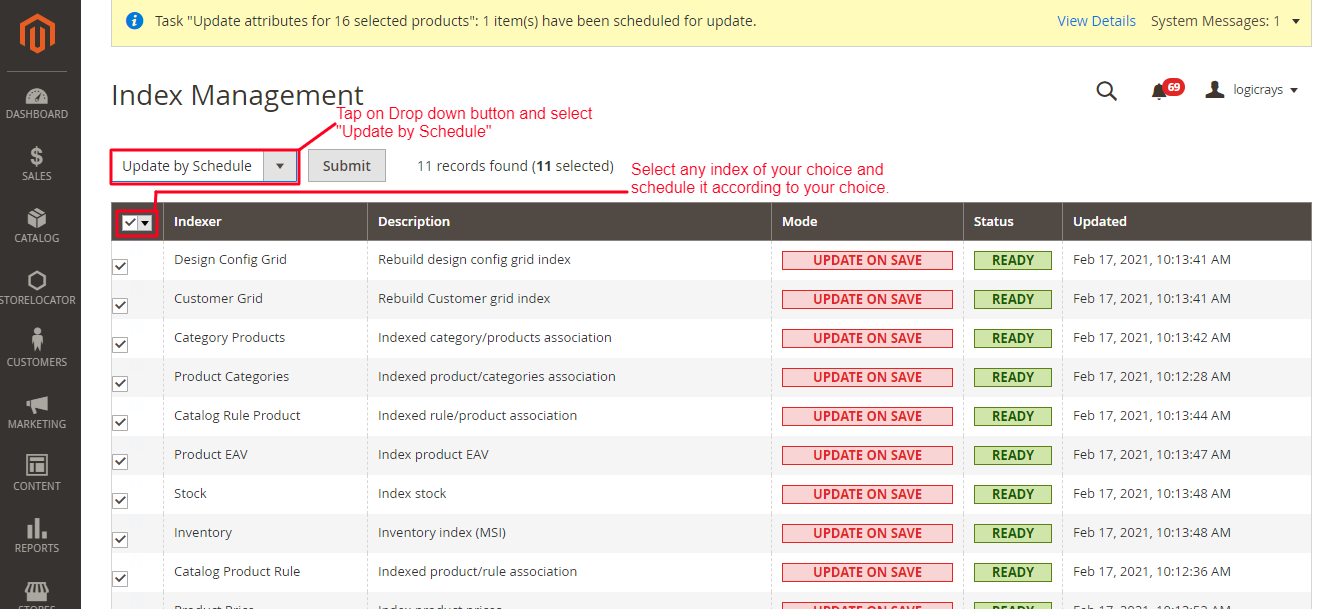
Step 2: Select the indexes and select “Update by Schedule” 

Index Management

Moreover, It is not necessary to update by schedule but, If you do decide to change this to update by schedule, then you can amend this schedule by:

Step 3: Head to 

Stores-> Configuration 

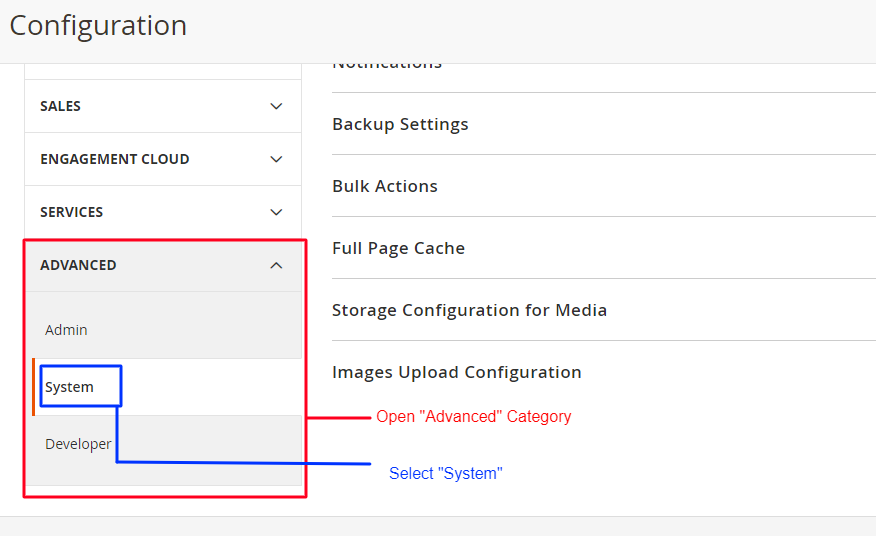
Step 4: In Configuration section, open Advanced tab on left panel, and in that open “System” option. 

Configuration System

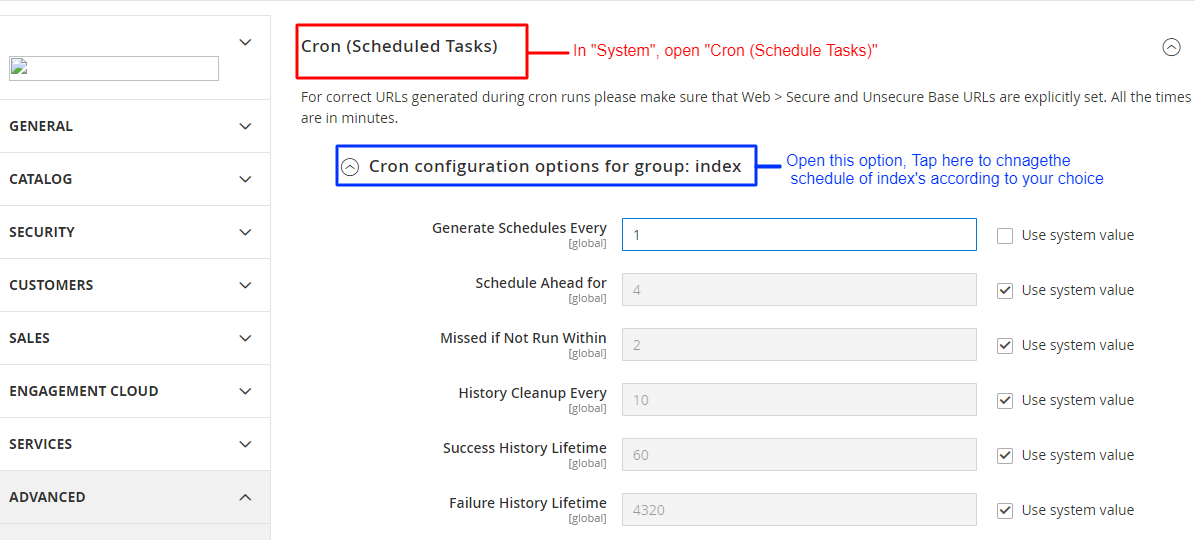
Step 5: As you selected “Update by schedule” in Index Management. You’ll be able to see the accessible option to change the time and schedule index according to your time. 

Configuration for group index

 #9 Disable All Debug Logs

Sometimes you can find debug logs as a very heavy resource on your Magento 2 store. These types are just vlogs, that tend to write large files to your system that aren’t necessary. Your final results may differ between seeing no difference to seeing a little difference in store optimization.

Debugs logs are normally off by default, it’s always worth checking to check your setup from time to time. 

To check your setup go to: 

Step 1: Head to

Store-> Configuration

Step 2: Open “Advanced” in the left tab,in that, open “Developer”.

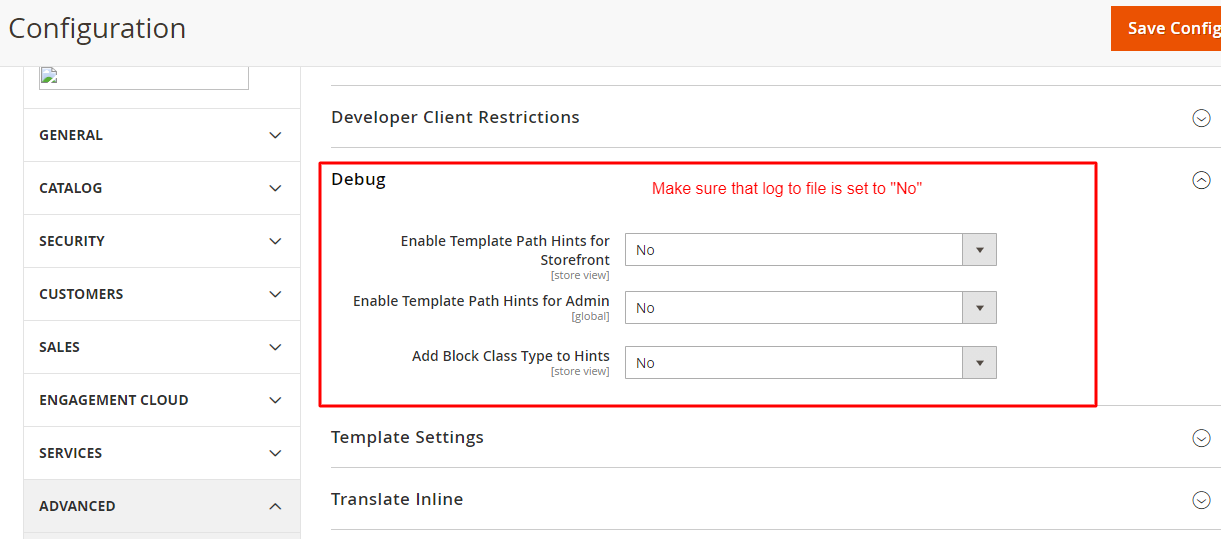
Configuration

Step 3: Set “No” in log to file. If not then make sure to select “No”.

Configuration

#10 Merge JS And CSS File 

Unmerged Javascript and CSS are one of the main reasons that causes high loading time in your Magento 2 eCommerce store. Here, Eliminate redundant or unnecessary data with this process. And after merging these files, it cannot be modified.

Reduction in the number of requests to the server due to merging of JavaScript and CSS will ultimately give better results in loading time of the store. 

Follow these steps to Merge JavaScript and CSS files:

Step 1: Head to 

Store-> Settings-> Configuration

Step 2: On left panel, expand the “Advanced” tab, in that select “Developer” option 

Step 3: Expand CSS Settings, now in “Merge CSS File” set “Yes”

Configuration

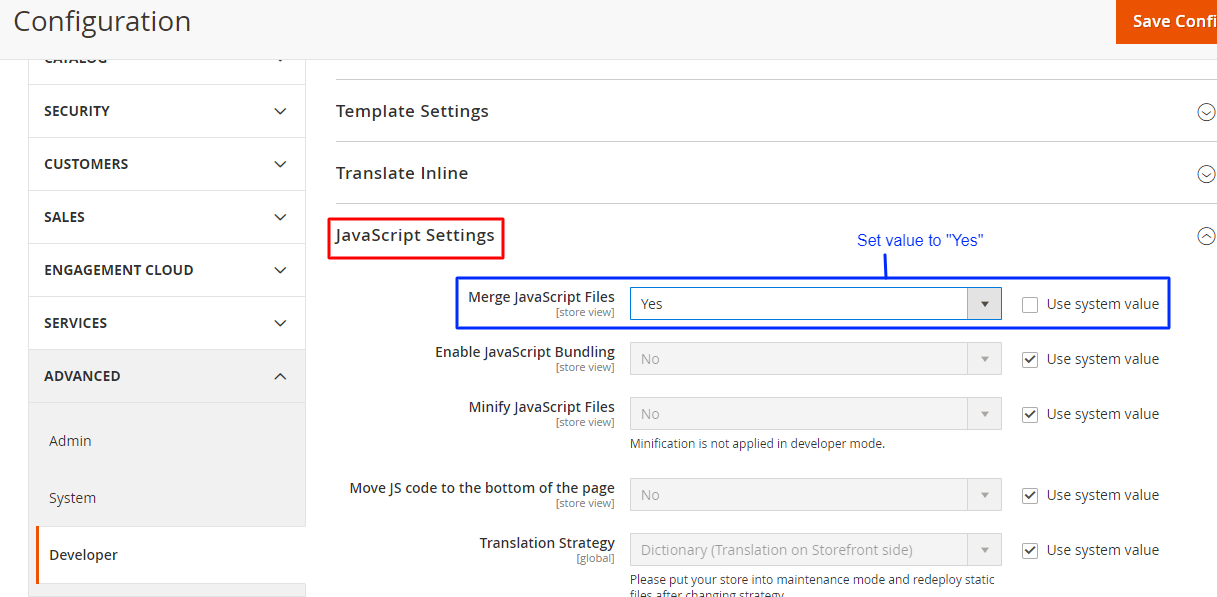
Step 4: In the Developer section, open “JavaScript Settings”. In that, set the “Yes” in “Merge JavaScript Files”.

Configuration

Step 5: Save Configuration!

Takeaway

Magento 2 is very vast, there are numerous ways to speed up your Magento 2 site. Here, the choice is yours! Choose the ways that are most suitable for your Magento 2 site. All you need to remember is: Faster and nicely optimized your personal site development environment is, faster your eCommerce Magento store will be in competition. 

The above mentioned tips will help you increase Magento 2 site speed. Well, it is true that a well optimized Magento eCommerce store provides a faster and overwhelming browsing experience to its users. Therefore, with these tips, experience the best engagement rate and conversion rate. 

For more tips, check out our article on Magento Speed Optimization. Also, check out some of the most astonishing eCommerce trends in 2021. All you need is to go with the trend and make your website powerful as much as you can. 

Ciao!

site-loader