How to Migrate from Magento 1 to Magento 2

Magento has long been a go-to platform for eCommerce businesses. It has been powering over 250,000 merchants globally thanks to its flexibility, scalability, and strong developer ecosystem. But in June 2020, Magento officially ended support for Magento 1. This has left thousands of online stores exposed to security vulnerabilities, outdated code and lack of technical support. Continuing on Magento 1 is like driving an old car with no seatbelts or spare parts. So we have to now move from Magento 1 to Magento 2, but without leaving our valuable data behind, right?

Upgrading to Magento 2 isn’t just a technical necessity—it’s a smart business move. With Magento data migration, you gain:

  • faster performance
  • enhanced security protocols
  • high-end and faster mobile responsiveness
  • features like advanced admin tools 
  • streamlined checkout
  • integrated SEO enhancements.

Today we will help you break down the easy steps on “how to migrate from Magento 1 to Magento 2”—step by step. But before we learn Magento 1 to Magento 2 migration steps, we need to find out why are we doing it this year:

Why Migrate to Magento 2?

1. Magento 1 Officially Reached End-of-Life in June 2020:

That means no more security patches, updates or official support. If you’re running a store on Magento 1, you’re wide open to data breaches, fraud and compliance issues like PCI-DSS violations. If you do not migrate customers from Magento 1 to Magento 2, then it is dangerous if you’re handling credit card transactions. Magento 1 websites experience 62% more attempted cyberattacks than stores running on Magento 2.

2. Enhanced Performance, Scalability, and Mobile Responsiveness in Magento 2:

Why Migrate to Magento 2

Magento data migration from 1 to 2 means add on speed and growth. It loads pages 50% faster and handles 39% more orders per hour. For example, if you’re running flash sales like a fashion brand or processing high traffic like electronics sellers, Magento 2 won’t buckle under pressure. Magento 2 checkout is 38% faster than Magento 1, improving cart abandonment rates by up to 27%.

3. Better Admin Interface, Improved Checkout and SEO Capabilities:

Magento 2’s admin panel is user-friendly—even for non-tech store managers. It also features a streamlined 2-step checkout and built-in SEO tools, improving conversion and visibility. Stores that upgraded to Magento 2 saw a 20% average increase in conversion rate within 3 months.

4. Access to Modern Extensions and Support Community:

Magento data migration gets you top-rated extensions today that are Magento 2-compatible only. Plus, the active developer community ensures regular updates and help. Magento 2 supports over 3,000 extensions, while Magento 1 is no longer supported by most extension developers.

Now we come down to Magento 1 to Magento 2 migration steps

Pre-Migration Planning:

Pre Migration Planning from Magento 1 to Magento 2
Image Source: Magento vista Amebaownd

Before jumping into the Magento 2 migration, you need a solid game plan. We are now sharing how to migrate from Magento 1 to Magento 2:

  • Start with a full site audit. Analyse what pages, features or workflows work well—like Amazon-style product filters—and what’s outdated. Remove clutter and streamline navigation.
  • List every extension, custom code, third-party theme and integration currently running. Tools like Magento Marketplace help check if your extensions have Magento 2-compatible versions.
  • Next, evaluate your hosting environment. Magento 2 demands more power—cloud hosting or scalable services like Adobe Commerce Cloud or Nexcess may be better options.
  • Decide whether you’re doing a clean rebuild (for better performance and UX) or a direct migration (for speed). For example, brands like Cox & Cox opted for fresh builds to unlock new features.

Finally, map a timeline and assign the right people—developers, designers, QA testers. Magento data migration from 1 to 2 can take 3–6 months, depending on complexity. Planning now saves chaos later.

Read More: How to Create a Custom Theme in Magento 2 – Step-by-Step

How to Set Up the Magento 2 Environment:

  1. Use a staging server by installing Magento 2 on a test (staging) server—not your live store. This helps you experiment safely.
  2. Install Magento 2 and for this you need to download Magento from the official site. Further on upload it to your server using a tool like FTP or cPanel.
  3. Set up requirements ensuring that your server has:
    • PHP (backend engine)
    • MySQL (stores product data)
    • Elasticsearch (speeds up product search)
  4. Check Compatibility to confirm your server supports the required PHP version (like 8.1), has enough memory (at least 2GB) and runs smoothly with Magento.
  5. Test Everything which means loading the sample data (like clothes or books) and test search, cart, and page speed.

Migrating Data from Your Old Store to Magento 2:

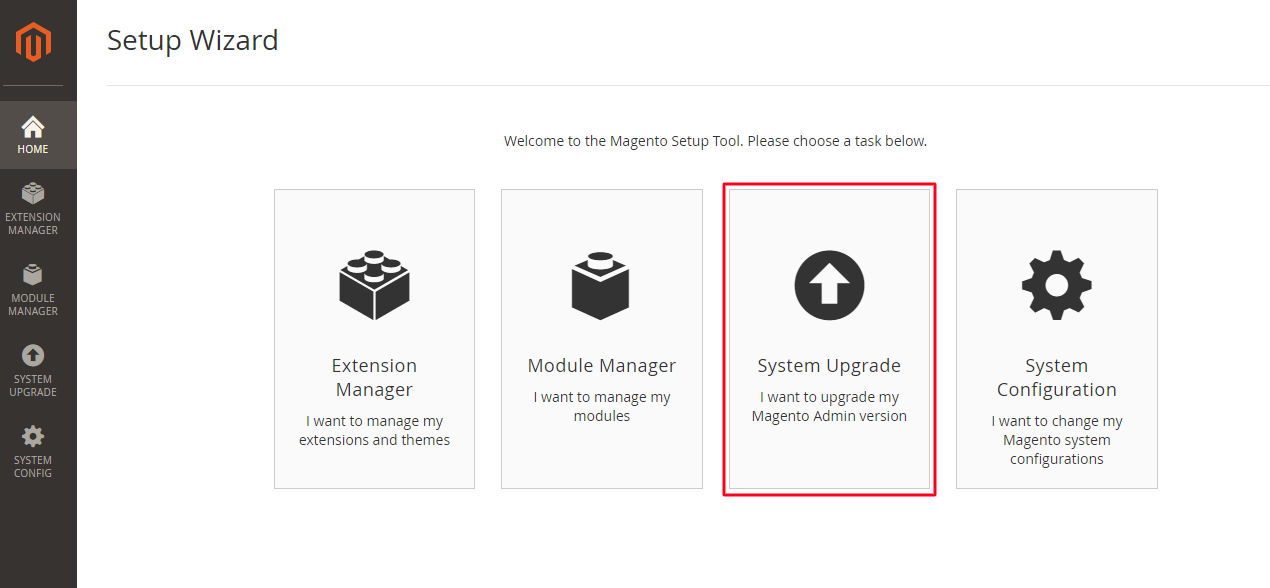
When you’re moving your online store from Magento 1 to Magento 2, you don’t want to start from scratch. That’s where the Magento Data Migration Tool helps. It helps smoothing the process of Magento Data Migration from 1 to 2 and you don’t lose anything.

The Role of Data Integrity in Magento Migration:
Data integrity is crucial to ensure no product or customer information is lost during the migration. The Magento Data Migration Tool helps preserve this integrity by mapping your data correctly and maintaining its structure.

What Gets Moved Over:

  • All your products (like T-shirts, bags, kitchenware)
  • Categories (e.g., “Men’s Shoes,” “Home Decor”)
  • You also migrate customers from Magento 1 to Magento 2 which means customer information (names, addresses, past orders)
  • Sales data (invoices, transactions)
  • Store settings (tax rules, shipping zones, etc.)

Step-by-Step Migration Process:

  1. First, backup your Magento 1 store—just in case anything goes wrong.
  2. Then, install the Magento Data Migration Tool on your server.
  3. Next, follow the steps to migrate:
    • General settings and configurations
    • Migrate all your data
    • Make new changes since the first copy (called incremental updates)
  4. Finally, fix any issues that pop up—like missing product attributes or mismatched IDs.

Important Note: This tool doesn’t migrate your website’s theme or extensions. So, if you have a custom homepage design or special features (like a Wishlist pop-up), you will need to rebuild or find Magento 2 versions separately.

Read Also: How Magento can help to boost your new or existing business?

Moving Your Store’s Look and Features to Magento 2:

Image Source: Pixelnet

When you upgrade to Magento 2, the design (theme) and extra features (extensions) from Magento 1 don’t carry over automatically—they’re built differently under the hood.

Themes- Whether to Rebuild or Replace?

Your old store’s look won’t work in Magento 2 as-is. So, you have two choices:

  1. Rebuild the same design using Magento 2 tools, if you want to keep the same look.
  2. Or, pick a new theme that’s already made for Magento 2. This saves time and may offer better performance.

Optimizing Magento 2 for Mobile:
Magento 2 offers several mobile-friendly themes and tools that allow you to optimize your store for mobile shoppers. By choosing a responsive theme and optimizing images, you ensure a seamless shopping experience on smartphones and tablets.

Extensions – Choose Only What You Need:

Go through your current store and make a list of the essential extensions. You will find things like product sliders, coupon tools, or review widgets. Then find Magento 2 versions of those. Magento data migration from 1 to 2 means you must skip any outdated or unsupported ones. The latter can cause errors or slow your new site down. This step among the Magento 1 to Magento 2 migration steps is key to giving your store a smooth, fresh start. It will ensure not dragging old issues into the new build.

Magento 2 Extensions to Boost Your Store’s Performance:
Magento 2 comes with several extensions that can enhance the functionality of your store. Some top extensions include:

  • Magento 2 Page Speed Optimizer to improve load times.
  • Magento 2 SEO Suite for enhanced search engine optimization.
  • Magento 2 One Step Checkout to simplify the checkout process.

CTA:

Migrating Magento 1 to Magento 2 takes strategic planning. But it’s worth it for a faster, safer store. Don’t wait—start today. Download our free migration checklist to get started right.

FAQ’s:

1. Why should I move from Magento 1 to Magento 2?

Magento 1 is no longer supported since June 2020. That means no security updates, patches, or support—your store is at risk. Magento 2 gives better performance, mobile support, and safety.

2. Will I lose my products or customer data during migration?

No, your data like products, categories, customers, and orders will be safely moved using the Magento Data Migration Tool. It keeps everything intact during the process.

3. Can I keep my current website design in Magento 2?

Magento 1 themes don’t work directly in Magento 2. You can rebuild the same design or choose a new Magento 2-ready theme for better speed and user experience.

4. How long does the Magento migration process take?

The full migration usually takes around 3 to 6 months. Time depends on your store size, number of custom features, and how well your team is prepared.

How to Create a Custom Theme in Magento 2 – Step-by-Step

A Magento 2 theme controls how your online store looks and feels, from homepage banners to product grids and checkout pages. To understand it better, consider it like a shop-front window — it’s the first impression for every visitor. Like, when you visit Amazon India during Prime Day, or Nykaa’s Pink Friday Sale, the colours, buttons, layouts and product displays are all managed by their theme. Custom themes are much more than looks — they directly affect loading speed, usability and how trustworthy your store feels.

Most shoppers in India use mobile phones. So when you create a theme, make sure it’s mobile-friendly and loads quickly. Google ranks fast websites higher. Nykaa and Flipkart optimize their themes with compressed images and clean CSS to stay ahead.

Before we come to how to create a custom theme in Magento 2, lets us now know a few necessary things:

For Indian ecommerce sellers, a tailored theme allows you to align with local trends — like creating festive layouts for Diwali, adding cash-on-delivery icons or showcasing regional language banners.

Developers who build themes enable sellers to stand out in a crowded marketplace. Which means that even small tweaks like image placements or add-to-cart buttons can increase sales. For businesses, good design equals brand power and better customer retention. That’s why companies investing in custom Magento themes often explore bold strategies like integrating with Magento 2 Extensions Development to unlock advanced features and flexibility.

Why Magento 2 Theme Development Matters in India:

Magento 2 powers some of the most scalable and performance-focused eCommerce stores in the world. In India, where shopping experiences are influenced by cultural trends, festivals, payment preferences, and mobile-first usage, creating a custom Magento 2 theme is not just a visual update — it’s a business strategy.

According to Statista, over 82% of Indian eCommerce traffic comes from mobile. A responsive, festive, and fast-loading theme can increase customer trust, reduce bounce rate, and maximize conversions.

Pre-requisites of Theme Creation in Magento 2:

Theme Creation in Magento 2

The following skills will help you handle everything from layout tweaks to adding product banners:

  • Before you start, you’ll need a working Magento 2 installation. This step for Magento 2 theme development, needs to be done either on your local machine or a web server.
  • You should also be familiar with basic web languages like HTML, CSS and XML.
  • Plus, you must know how to access and edit files in your Magento directory.

Understanding Magento’s Theme Structure:

Magento Theme Structure (2)

Magento stores all themes inside the design frontend directory. This structure ensures every visual change — from the homepage slider to product thumbnails — stays organized and reusable.

  • For example, if you’re designing a site for selling sports shoes:
  • Your theme defines where product titles, price tags and add-to-cart buttons appear.
  • The theme.xml file provides key metadata like the theme’s title, its parent theme (often Luma), and a preview image for admin selection.
  • Registration.php is another critical file, telling Magento to register your theme for use during setup upgrades.
  • Static assets like CSS control product card designs, JavaScript adds interactivity (like hover effects on images) and image folders store assets like promotional banners for limited-time sales.
  • The layout and template folders decide where and how your product information is shown — for example, highlighting a “50% Off” badge on men’s watches or showcasing a “New Arrival” ribbon for summer kurtas on your homepage.

If you’re planning to modernize your store while keeping your current content, Magento 2 Migration Services can be a smart step before diving into full theme customization.

Read Also: Guide on How To Hire a Magento Developers With Expert Tips & Questions To Ask

Step-by-Step Theme Creation for Magento 2 with Real Ecommerce Examples:

When you run an online store, your design defines your brand. To create custom theme in Magento 2 step by step, you have to think of, for example Amazon’s clean layout or Nike’s bold website — both follow strict theme structures. Magento lets you create your own theme and here’s exactly how to do it.

1. Create Vendor and Theme Folders:

The first step for custom themes in Magento 2: Let’s say you run an online store called MyVendor and you are launching a special theme for your summer shoe collection. Go to the design folder, open the frontend folder and create two new folders. Name the first folder MyVendor and name the second folder mytheme. This helps Magento keep your themes neat and linked to your brand, just like how Zara uses specific themes for seasonal sales.

2. Define the Theme Configuration:

Doing this is a must in Magento theme 2 development. Open the mytheme folder and create a new file called theme dot xml. This file tells Magento your theme’s name, which existing theme it builds on, and the image you want to show in the admin preview. For example, for your shoe store theme, your theme dot xml might look like this:

  • Title is My Custom Shoe Theme
    – Parent is Magento Luma
    – Media preview image is media preview dot jpg

This helps Magento identify the design setup and lets you reuse Luma’s base code. Big ecommerce stores, like Flipkart, often reuse parent themes. Especially during new launches this helps save time and ensure stability.

3. Register the Theme:

Step by Step Theme Creation for Magento 2
Image Source: Cloudways

Just creating a theme isn’t enough, you need to register the Magento custom theme.

Inside the mytheme folder, create a new file called registration dot php. This file registers your theme with Magento so it shows up during setup. The script tells Magento your theme name and location. When you run setup upgrade later, Magento will list MyVendor mytheme as available. This is similar to how Shopify detects a new uploaded theme in its backend.

4. Set Up View Configuration:

Inside the mytheme folder, create an etc. folder and then create view dot xml. This file controls your product images. Suppose you want product images for shoes to show as three hundred pixels by three hundred pixels. You write that inside view dot xml. If your store runs a new handbag collection, you can change this to five hundred by five hundred. Brands like Nykaa and Ajio often use this logic to serve optimized images for mobile and desktop views. This is a very crucial steps for theme creation in Magento 2.
5. Add Basic Styling and Static Assets:

Inside the mytheme folder, create a web folder. Inside the web, create four folders named css, fonts, images, and js. These folders will hold your website’s styles, icons, product photos, and JavaScript code. Always use LESS files instead of plain CSS files. LESS makes it easier to manage large stylesheets, just like Amazon uses preprocessors for consistent and scalable design.

If you’re also planning to enhance performance and introduce better UX interactions, Magento 2 upgrade services can support your theme by keeping your store fast and secure.

6. Override Layout or Template Files:

If you want to replace the default Magento product page, create a Magento catalog folder inside your mytheme folder. Inside that, add templates or layout files.

Suppose you want to show a limited edition badge on your shoes. You can copy the original product view template into your mytheme folder and add the badge code. This is how online stores highlight best sellers, new arrivals, or flash deals. Another crucial stage of Magento 2 theme development.

7. Activate the Theme:

Log in to your Magento admin panel, go to Content, then Design and then Configuration. Pick your store view and select My Custom Shoe Theme from the list. If you want to activate the theme using commands, you can set the theme using Magento CLI. Larger stores like Pepperfry use it during deployments.

8. Run Setup and Deploy Commands:

Setup and Deploy Commands in Magento 2

Now open your terminal and run three important commands.

  • Run setup upgrade to register your theme.
  • Flush the cache so old data is removed.
  • Deploy static content to load CSS and images properly.

This process of theme creation in Magento 2 is just like Myntra running a refresh before their End of Season Sale goes live.

Read Also: Magento vs Shopify: How to Choose the Right E-commerce Platform?

Make Your Magento 2 Theme Festive-Ready for Indian Holidays

Indian shoppers spend big during Diwali, Eid, Christmas, and Independence Day. With Magento, you can create seasonal child themes under your base theme. Here’s how:

  • Use Diwali-themed banners with gold and maroon colors
  • Add a tricolor badge on the homepage during Republic Day
  • Highlight “Festive Combo Deals” with layout updates
  • Show “Pay with UPI” and “Cash on Delivery” icons prominently
  • Schedule theme activations via CLI before events

CTA:
To create a custom theme in Magento 2  isn’t just about creating a design — it’s a business strategy. Studies show 75% of users judge a company’s credibility based on website design alone. As per STATISTA, in India, where 82% of ecommerce traffic comes from mobile. In short, your theme can make or break sales. Ready to create a storefront that truly sells? Get in touch with us!

FAQ’s:

1. Can I create multiple custom themes for different store views in Magento 2?

Yes! Magento allows you to assign different themes for different store views — perfect for multilingual or regional stores.

2. What’s the difference between a parent theme and a child theme?

A parent theme (like Luma) contains reusable code. A child theme extends it with customizations while preserving upgrade compatibility.

3. Is it necessary to use LESS over CSS?

Yes, Magento 2 prefers LESS because it supports modular and scalable styling — making it easier to manage large designs like Flipkart or Amazon.

4. How do I test if my theme is responsive?

Use browser developer tools or tools like BrowserStack to test your theme across devices. Mobile-first design is critical in India’s mobile-heavy market.

Magento vs Shopify: How to Choose the Right E-commerce Platform?

Choosing the right e-commerce platform is a must for your business’s success. In the United States, Shopify leads with a 28.41% market share, powering over 2.8 million websites. Magento, while offering extensive customization, holds a smaller share.

But then which is better? “Is Magento better than Shopify? We are now providing a detailed Magento vs Shopify comparison to help you make a well-informed decision.

Overview of Magento:

Overview of Magento

Magento is an open-source e-commerce platform. It is world-famous for its flexibility and scalability. For a long time, it has been serving businesses of various sizes. As of the second quarter of 2024, there were approximately 144,477 active online stores operating on Magento. It reflects its significant adoption in the e-commerce landscape.

The platform offers extensive customization options. This means you can customize your online stores to specific business needs. Magento Development’s modular architecture has a wide range of extensions and API integrations. This propels functionality and user experience. Despite facing competition from platforms like Shopify and WooCommerce development, Magento maintains a notable market presence. This is particularly among larger enterprises seeking advanced e-commerce solutions.

Hire Magento Developer to take full advantage of Magento’s customization and scalability features.

Read More: Guide to Hiring Magento Developers

Overview of Shopify:

Overview of Shopify

Shopify helps businesses urgently create as well as easily manage e-commerce stores. In late 2024, Shopify reported a 26% increase in revenue, reaching $8.88 billion. This underlines how it has rapid growth and market prominence.

The platform has a user-friendly interface and a complete vast suite of tools. So far it has 900,000 plus merchants worldwide, ranging from small startups to large enterprises.

Shopify Development integrates artificial intelligence, exemplified by its “Shopify Magic” suite, which automates tasks. These tasks include key ones like generating discounts and product descriptions, which propels merchant efficiency.

During the Black Friday and Cyber Monday weekend in 2024, Shopify merchants achieved a record $11.5 billion in sales. It shows the platform’s capacity to support high-volume transactions.

Read More: Benefits of Shopify’s Mobile App for E-Commerce Businesses

Understanding Your Business Needs Before Choosing an E-commerce Platform:

  • Know your products, customers and expected sales
  • See if you need coding skills or if it’s easy to use
  • Check if the platform can grow with your business in the future
  • Ensure it works with payment, shipping and marketing tools
  • Compare costs, including hidden fees and transaction charges
  • Look for strong security, good support and legal compliance

Magento or Shopify: Which Platform Suits Your Business Model?

Which Platform Suits Your Business Model? Magento or Shopify

We are explaining this with two cases studies:

John and Michelle, two passionate entrepreneurs, set out to build online stores but had different needs and that’s where lies the key difference between Magento and Shopify.

John, launching a niche fashion brand, valued simplicity. He chose Shopify, an easy-to-use platform with built-in tools. This let him focus on marketing rather than coding. With Shopify’s secure hosting and 24/7 support, his store was live within days.

Michelle, running a tech accessories business, needed customization and control. She picked Magento vs Shopify, because the former is an open-source powerhouse offering flexibility. With a developer’s help, she built a customized e-commerce store. She integrated selective features and managed high traffic. Though Magento required more resources, it allowed unlimited scalability.

Magento vs Shopify comparison: Their choices reflected their business needs—Shopify for quick setup and low maintenance, Magento for advanced customization and control.

Read More: WooCommerce vs Magento

Magento vs. Shopify Comparison: Key Differences

1. Ease of Use:

The key difference between Magento and Shopify! Anyone can set up an online store without coding with Shopify but not with Magento. For example, a small clothing brand like Trendy Tees can launch its Shopify store in a day. Magento needs developers. A large retailer like Nike India uses Magento because they have a tech team to manage the platform.

2. Customization and Flexibility:

Customization and Flexibility in Magento & Shopify

Magento vs Shopify – Magento allows deep customization. A Luxury Watches Co. can create custom product pages, advanced checkout flows and special loyalty programs. Shopify offers some customization but with limits. An Organic Beauty Hub can change themes and use apps but cannot modify the system at the same level as Magento.

3. Cost Implications:

    When it comes to costing, is Magento better than Shopify? Shopify has a monthly fee starting at $29, including hosting and security. A handmade jewelry business can budget easily. Magento’s open-source version is free, but businesses must pay for hosting, security and developers. A big brand like Ford can afford Magento’s higher development costs.

    4. Scalability:

      Magento or Shopify? Shopify handles traffic spikes well. For instance Gadget Mart, which sees high Black Friday sales, won’t have website crashes. Magento needs strong hosting. Global Electronics, selling worldwide, invests in powerful servers to manage growth.

      5. B2B Features:

      B2B features in Magento and Shopify

        Magento supports B2B sales better. A wholesale furniture supplier can offer bulk pricing, custom orders, and multiple payment options. Shopify relies on apps for B2B, so a custom packaging company may need extra tools for bulk orders.

        6. Performance and Speed:

          What more for Magento vs Shopify? Latter is optimized for fast loading. For instance Pet Essentials, a small pet store, benefits from this. Magento sites depend on hosting. If Mega Tools, a hardware store, uses slow servers, their site may lag.

          7. Security Measures:

            In terms of safety, is Magento better than Shopify? Shopify handles security, including SSL and PCI compliance, making it safer for small businesses like a BabyCare Store. Magento users manage security themselves, which is why big companies like Land Rover invest in cybersecurity teams.

            8. Themes and Design:

            Themes and Design of Magento & Shopify

              Shopify offers pre-designed themes. So a Floral Decor store can choose a template and launch quickly. Magento allows full design control. A high-end fashion brand like Elite Couture can create a completely bespoke design.

              Pros & Cons of Magento vs Shopify:

              Pros of Magento:

              • Highly customizable platform for bespoke e-commerce experiences
              • Advanced API integrations for smooth third-party tool connections
              • Flexible theme customization for unique store designs
              • Strong security features, assuring data protection and compliance
              • Scalable for large businesses with complex product catalogs

              Cons of Magento:

              • Requires technical expertise, making it less beginner-friendly
              • Higher maintenance costs, including hosting and security management
              • Slower setup time compared to Shopify

              Pros of Shopify:

              • User-friendly with an excellent user experience
              • Shopify Plus has advanced features for enterprise-level businesses
              • Built-in Shopify POS for stress-free online and offline sales
              • Strong security features
              • Easy theme customization with a vast template library

              If you’re looking to set up a Shopify store with custom features, Hire Shopify Developer to ensure seamless integration and optimization.

              Cons of Shopify:

              • Limited flexibility compared to Magento’s customizable platform
              • Advanced API integrations require additional costs or third-party apps
              • Shopify transaction fees apply unless using Shopify Payments

              Conclusion:

              Shopify is great for small to mid-sized businesses needing an easy-to-use platform. Magento is best for large companies needing advanced customization and a tech team. If you wish to set-up an e-commerce store or have more queries about Magento vs Shopify comparisons, you can always write to us.

              FAQ’s:

              1. What is the main difference between Magento and Shopify?

              Shopify is easy to use and best for beginners, while Magento is for businesses needing advanced customization. Shopify requires no coding, whereas Magento needs developers for setup and management.

              2. Which is better for small businesses, Magento or Shopify?

              Shopify is better for small businesses as it has ready-made tools, secure hosting, and an easy setup. Magento is more suited for big businesses that need custom features.

              3. Is Magento more expensive than Shopify?

              Magento’s open-source version is free, but you need to pay for hosting, security, and developers. Shopify has fixed monthly plans starting at $29, which include hosting and security.

              4. Which platform is better for large businesses?

              Magento is better for large businesses as it allows full customization, advanced B2B features, and scalability. Shopify Plus is also an option but has fewer customization options than Magento.

              5. Can I customize my Shopify store like Magento?

              Shopify offers themes and apps for customization, but it has limits. Magento gives full design and feature control, making it better for businesses that need unique customization.

              6. How do I decide between Magento and Shopify?

              If you need a simple, hassle-free store, go for Shopify. If you need advanced customization and have a development team, choose Magento. Consider your budget, business size, and technical skills before deciding.

              WooCommerce vs Magento 2024: Features, Pricing, and Security Compared

              Choosing the right platform for your eCommerce venture is crucial when starting or expanding in India. Magento and WooCommerce, two prominent contenders, provide distinct advantages and cater to different business needs.

              Magento is often known for its robust functionality, advanced features, and scalability; thus, it stands out as an excellent choice for larger enterprises or those with complex requirements. However, WooCommerce is favored for its simplicity, cost-effectiveness, and smooth integration with WordPress.

              This article delves into the Magento vs WooCommerce debate, focusing on features, pricing, security, performance, and scalability to assist you in making an informed decision that aligns with your business goals.

              For businesses seeking expert guidance, investing in WooCommerce and Magento development services can streamline the process. These services ensure that your online store is built to meet your goals efficiently.

              Additionally, if you want to customize your platform or scale your business, you can hire WooCommerce developers or hire Magento developers to create a solution tailored to your needs.

              Let’s explore how these two platforms stack up and determine which one is the perfect fit for your eCommerce journey.

              Key Differences Between WooCommerce and Magento:

              Magento vs WooCommerce Comparison

              Both WooCommerce and Magento cater to different eCommerce needs, making them suitable for various business sizes and goals. Please check the table below for a detailed comparison of their key differences across features, scalability, security, and more.

              Feature WooCommerce Magento
              Starting Price Free Free
              Design and Themes Access to all WordPress themes Variety of themes (paid and free)
              Discounts and Promo Codes Create promo codes: case sensitive and tied to product IDs Create rules for catalog price, shopping cart price (automatic discounts), and promo codes.
              SEO Tools WordPress SEO extensions available SEO included by default
              Add-ons and Extensions 400 extensions (free and paid) Almost 4,000 extensions available (free and paid)
              Security Depends on your website hosting provider, but has secure sockets layer (SSL) support Dedicated security patches and SSL certificates available
              Ease of Use Designed for beginners; integrates seamlessly with WordPress. Steeper learning curve; ideal for developers or advanced users.
              Hosting Requirements Self-hosted; relies on WordPress hosting providers. Requires robust hosting for optimal performance, especially for larger stores.
              Customization Highly customizable using WordPress themes and plugins. Advanced customization with greater flexibility for developers.
              Performance Performance depends on hosting provider and installed plugins. Optimized for handling large product catalogs and high traffic.
              Scalability Best for small to medium-sized businesses. Suitable for medium to large-scale enterprises and growing businesses.
              Community Support Backed by the large WordPress community, with numerous forums and resources. Supported by a smaller but highly specialized community of Magento users and developers.
              Product Management Basic product management; suitable for simple stores. Advanced product management with features like configurable products and multiple attributes.
              Multilingual Support Requires plugins like WPML for multilingual capabilities. Built-in multilingual support with additional localization features.
              Pricing for Add-ons Generally lower cost for plugins and extensions. Add-ons and extensions can be expensive, especially for advanced functionalities.

              Magento vs. Woocommerce Features:

              Please check the below points for a detailed breakdown of feature differences between Magento and WooCommerce. This comparison highlights their unique functionalities to help you choose the right platform for your business.

              1. Customizability and Flexibility:

              Magento is highly customizable, making it ideal for enterprises with complex requirements. Its extensive range of extensions and adaptability to coding allows for creating unique, feature-rich stores tailored to large businesses.

              On the other hand, WooCommerce is more straightforward to use, and it integrates seamlessly with WordPress plugins and themes, making it a perfect choice for small—to medium-sized businesses that value ease of use and quick setup.

              2. Product and Inventory Management:

              Product and Inventory Management
              Product and Inventory Management

              Magento excels with advanced inventory management tools, catering to businesses handling thousands of products. WooCommerce offers straightforward inventory management features, ideal for smaller catalogs.

              3. User Experience (UX) and UI Design Options:

              User interface design options for WooCommerce and Magento

              Both platforms allow user-friendly designs; however, Magento supports multi-layered UX designs for enterprise-level stores. WooCommerce, with its range of WordPress themes, delivers aesthetically pleasing and functional designs.

              4. Multi-Store and Multi-Language Support:

              Multi store and Multi language Support

              Magento supports out-of-the-box multi-store functionality, perfect for businesses operating in various markets. WooCommerce, while not inherently multi-store, can achieve similar capabilities with plugins. Both platforms support multi-language setups.

              5. SEO and Marketing Tools:

              SEO Marketing Tools for E-Commerce Website

              Magento, a robust platform, offers built-in SEO tools: metadata management, URL rewriting, and XML sitemaps. These tools are ideal for advanced marketing strategies. WooCommerce, however, is powered by WordPress plugins like Yoast SEO, which ensures effective optimization for smaller stores. Although Magento suits large-scale campaigns, WooCommerce excels in simplicity and flexibility for basic SEO needs.

              Also Read: WooCommerce vs BigCommerce: Choosing the Best E-Commerce Platform

              Magento vs WooCommerce Pricing:

              Please check the below points for a detailed breakdown of pricing differences between Magento and WooCommerce including starting costs, add-ons, and ongoing expenses to help you make an informed decision.

              1. Initial Setup and Development Costs:

              Magento (particularly its paid version, Magento Commerce) demands substantial upfront investment.

              The setup process often involves hiring skilled developers to handle its complex configurations and ensure the platform is tailored to specific business needs. It makes it a premium choice for enterprises with larger budgets.

              In contrast, WooCommerce offers a cost-effective start as the plugin is free to install on WordPress. Small businesses and startups can save significantly on initial setup costs, especially if they can access in-house technical resources.

              2. Hosting and Maintenance Costs:

              Hosting and Maintenance Costs

              Magento requires high-performance hosting to support its robust features and manage heavy traffic, which leads to higher recurring hosting and maintenance costs. Its complexity, however, often demands professional support for updates and management.

              In contrast, WooCommerce is less resource-intensive and works efficiently on standard WordPress hosting for small businesses, aiming to reduce operational expenses.

              3. Plugin and Extension Costs:

              Magento provides premium extensions for advanced functionalities, catering to businesses with complex needs.

              WooCommerce, however, offers a wide range of more affordable plugins. This makes it ideal for small—to medium-sized companies seeking practical solutions within budgets.

              4. Long-term Scalability and Total Cost of Ownership:

              Magento scales seamlessly for businesses targeting significant growth or global expansion, but its costs rise with complexity.

              WooCommerce offers a more affordable solution for small businesses with moderate growth goals, requiring fewer resources initially but needing upgrades for larger-scale expansions as the business grows.

              Must Read: Magento Development : Everything you need to know

              Magento vs WooCommerce Security:

              Security is a crucial aspect when choosing an eCommerce platform. Please check the below points for a detailed comparison of the security features offered by Magento and WooCommerce.

              1. Core Security Features:

              Magento provides robust built-in security features such as advanced password management, two-factor authentication, and strong encryption, ensuring a secure platform. WooCommerce, on the other hand, leverages WordPress’s security framework, which can be strengthened through additional plugins.

              2. Updates and Patching:

              Magento provides regular security patches, ensuring enterprise-grade protection and quick resolution of vulnerabilities, but it requires technical expertise for implementation. WooCommerce depends on WordPress updates, which may delay critical security fixes. Because of this, stores could be left exposed for longer periods.

              3. Third-Party Security Plugins and Extensions:

              Both platforms support third-party security tools. Magento has dedicated extensions, while WooCommerce benefits from WordPress-compatible security plugins like Wordfence.

              4. GDPR Compliance and Customer Data Protection:

              Both Magento and WooCommerce support GDPR compliance. However, Magento provides more advanced, built-in tools for data security. In contrast, WooCommerce requires numerous third-party plugins to achieve comprehensive GDPR compliance.

              Also Read: How Magento B2B E-commerce/Marketplace Solution can help to boost your profit?

              Magento vs WooCommerce Performance and Scalability:

              Performance is crucial in determining the success of an online store, especially as businesses scale and evolve.

              1. Page Speed and Loading Times:

              Magento is a resource-heavy platform, and without proper optimization, it can lead to slower page speeds and longer loading times. Its complexity demands more server resources, which can affect performance. In comparison, WooCommerce, being less resource-intensive, typically performs better on lightweight hosting, offering faster page load times. This makes WooCommerce a more efficient choice for businesses looking for better performance with minimal setup.

              Also Read: Magento Speed Optimization

              2. Scalability for Small, Medium, and Large Businesses:

              Magento is well-suited for medium to large enterprises because of its ability to manage high traffic volumes and complex operations. Its scalability ensures smooth performance as the business grows. WooCommerce, however, is better suited for small- to medium-sized companies that offer moderate scalability to meet growing needs.

              3. Mobile Responsiveness:

              Both Magento and WooCommerce offer mobile-responsive themes, ensuring that online stores deliver a seamless and user-friendly experience across mobile devices. This responsiveness is essential for capturing mobile traffic because it provides customers with smooth navigation and enhances overall user satisfaction.

              Which Platform is Right for Your Business?

              Best Platform for Your Business

              1. Ideal Use Cases for Magento:

              Magento is ideal for enterprise-level businesses, especially those with large product catalogs or multi-store operations. It offers scalability, robust performance, and extensive customization options, perfect for businesses with complex eCommerce requirements.

              2. Ideal Use Cases for WooCommerce:

              WooCommerce offers an easy-to-use platform that enables cost-effective setup and operation. That’s why it is ideal for small businesses, startups, and entrepreneurs seeking affordable solutions with essential features.

              3. Key Considerations for Decision-Making:

              Consider your budget, growth plans, and technical expertise. Magento offers scalability but demands higher maintenance costs, while WooCommerce is more economical but may require plugins for advanced functionalities.

              Conclusion:

              Choosing between Magento and WooCommerce ultimately hinges on your specific business requirements, budget constraints, and technical proficiency. Both platforms are excellent for constructing online retail spaces. However, the ideal selection is contingent upon your objectives.

              If you require assistance deciding or in the setup process, do not hesitate to contact LogicRays. LogicRays will assist you throughout the journey, ensuring that your store functions smoothly and helps you effectively promote your eCommerce growth.

              FAQs:

              Q: What are the main differences between WooCommerce and Magento?

              A: WooCommerce is a user-friendly, WordPress-based plugin ideal for small to medium-sized businesses, offering extensive customization through plugins and themes. Magento, on the other hand, is a robust, standalone eCommerce platform designed for larger enterprises, providing advanced features, scalability, and greater flexibility for complex store requirements.

              Q: Which platform is more cost-effective, WooCommerce or Magento?

              A: WooCommerce is generally more cost-effective for smaller businesses due to its free core plugin and a wide range of affordable extensions. Magento offers a free Community Edition, but the Enterprise Edition can be expensive, making it more suitable for larger businesses with higher budgets.

              Q: Which platform offers better SEO capabilities, WooCommerce or Magento?

              A: Both platforms are SEO-friendly, but WooCommerce benefits from the powerful SEO plugins available for WordPress, such as Yoast SEO. Magento includes robust SEO features by default, allowing for comprehensive optimization without additional plugins.

              Q: Which platform has a larger selection of themes and extensions, WooCommerce or Magento?

              A: Magento boasts nearly 4,000 extensions, offering extensive functionality and customization options. WooCommerce has around 400 extensions, which are generally easier to integrate and more affordable, making it suitable for businesses with specific needs.

              Q: How do WooCommerce and Magento handle payment gateways and shipping options?

              A: Both platforms support a wide range of payment gateways and shipping options. WooCommerce integrates seamlessly with numerous WordPress plugins to extend payment and shipping functionalities, while Magento offers built-in support and extensive extensions for diverse payment and shipping needs.

              Q: What are the hosting requirements for WooCommerce and Magento?

              A: WooCommerce requires a reliable WordPress-compatible hosting provider, typically shared or managed hosting for smaller stores. Magento demands more robust hosting solutions, such as VPS or dedicated servers, especially for larger and more complex eCommerce sites to ensure optimal performance.

              Q: Which platform is better for integrating third-party services and APIs, WooCommerce or Magento?

              A: Magento excels in integrating with third-party services and APIs due to its flexible architecture and extensive API support. WooCommerce also supports integrations through plugins and custom development, but Magento generally offers more robust and scalable integration capabilities.

              Q: Which platform provides better analytics and reporting tools, WooCommerce or Magento?

              A: Magento offers advanced built-in analytics and reporting tools suitable for large businesses needing detailed insights. WooCommerce provides basic reporting features, which can be enhanced with various plugins and integrations to achieve more comprehensive analytics.

              Q: Which platform offers better mobile optimization, WooCommerce or Magento?

              A: Both platforms support mobile-optimized themes and responsive designs. Magento provides more advanced mobile optimization features out of the box, while WooCommerce relies on the chosen WordPress theme and plugins to ensure a seamless mobile experience.

              Q: Can I migrate my existing store from WooCommerce to Magento or vice versa?

              A: Yes, migrating between WooCommerce and Magento is possible but can be complex due to differences in architecture and data structures. It typically requires careful planning, the use of migration tools or plugins, and sometimes professional assistance to ensure a smooth transition without data loss.

              Magento Speed Optimization Techniques- How to Speed up Your Online Store?

              Magento, being one of the most popular eCommerce platforms, most enterprises choose to rely on it to build online stores. It offers a variety of themes and customization options that every business would want to provide its customers. And hence, the platform is famous for its versatile yet high-performing quality.

              Among the top 100,000 eCommerce websites, 16% of them are using Magento as their eCommerce framework, and the number becomes 22%, including the Magento Enterprise plans. The number is enough to believe the significance of the eCommerce framework.

              To ensure your eCommerce store remains high-performing, there are specific speed optimization steps to follow. These Magento development services can help merchants address multiple issues related to website performance, from loading speed to navigation and overall user experience.

              Why does Website Speed Matter for e-commerce?

              According to a survey, people take all of five seconds to decide whether they want to be on a website or not. If a website is slow, people move on to other websites. This is why website speed matters a lot in e-commerce. The main idea is to make visitors stay on your website longer than five seconds. This will help you with getting more customers and increase sales.

              How does a  slow-loading Website Affect Sales?

              A slow-loading website, as mentioned above, is enough to drive away potential customers. If they don’t spend time on the website, there wont be any sales. A slow-loading website means you lose visitors and customers at the same time. In order to have sales, you need people who will spend time on your website as mentioned above. This way you will get to have increased sales as well.

              What are the common Issues With Magento Website Performance?

              As mentioned above, slow speed is a primary issue with a Magento website. Other issues include the following:

              • Poor hosting
              • Incorrect operating modes
              • A problematic caching system
              • Excessive use of extensions or themes

              Let’s discuss some essential speed optimization techniques in Magento. It should help you increase website loading speed and hence, a good customer engagement ratio.

              Cache Management

              There are multiple forms of caching you can implement with Magento to enhance performance. Successful combinations include NGINX, APC, MemCache, and Varnish caching. The framework also provides a built-in cache management module, but developers should ensure that these cache types are enabled.
              In addition to server-side caching, optimizing browser caching is crucial for speed optimization. This can be achieved by adding a .htaccess file and enabling Gzip compression. While the latest versions of Magento typically have this setting enabled by default, older versions may require manual configuration.
              For effective implementation of these caching strategies, it’s advisable to hire Magento developers who can ensure that your caching system is optimized for the best performance.

              Content Delivery Network

              It’s important to serve your website visitors with immediate content. Especially when you have an eCommerce website and visitors instantly want the products on the display. It becomes frustrated for visitors to wait for longer waiting times. To optimize it, you need to manage it with a content loading mechanism.

              To see a positive change in your website loading time, implementing a content delivery network always works. It is one of the easiest methods to decrease website loading time. You can get the content loaded for your website visitors from different locations around the world. So the buyers can easily navigate through the product images and related animations.

              Image Optimization

              Images can significantly slow down your website if they are not optimized. Large image sizes in MBs consume more space, increasing the waiting time for product pictures to load. Prospective buyers prefer a seamless experience, making it crucial to display optimized images that load quickly.

              You can enhance the performance of your Magento 2 site by optimizing images. By compressing image sizes and converting product images to JPEG format, you can achieve a notable improvement in loading speed. Additionally, keeping layout and logo images in PNG or SVG formats is essential to maintain the website’s look and feel.

              For those looking to implement these optimizations effectively, a Magento 2 upgrade service can provide the necessary tools and expertise to ensure your images are optimized for the best performance.

              Installing Varnish

              Varnish is an open-source full-page cache accelerator to increase the HTTP level traffic. Since the plugin is faster than the built-in cache accelerator, configuring it to the website makes perfect caching for eCommerce websites. It caches the parts of your webpage like fragments of files in temporary memory. Hence, it increases page loading speed and reduces response times. It helps with the entire HTTP protocol to overcome the problems with servers which are giving slower response times in bigger eCommerce websites.

              To configure Varnish in your Magento Admin panel:

              1. Stores > Configuration > Advanced > System >Full Page Cache
              2. Caching Application List > Varnish Caching
              3. Enter value in TTL for Public Content Field
              4. Enter the specific information by expanding the Varnish Configuration field.

              Full Page Cache

              Magento 2 has made it easy to implement full-page cache. You don’t need to use a false attribute to exclude a block since it considers an entire page in which the block is residing. You can check on multiple pages where cacheable attributes are used to see whether the pages have problems with caching. There are also manual techniques to cache the full page. You can do it by putting the store in development mode on a local or staging environment.

              This is one of the essential tricks that developers use to optimize Magento stores.

              Minimize JS and CSS

              Javascript and CSS can slow down your Magento website by increasing the number of requests. Minimizing these files can speed up magento website. Here is how to do it. In the admin panel of the website, you need to navigate to the developer settings. Then you need to go to javascript settings and CSS settings and merge them together.

              Improve TFFB

              This is one of the key factors to consider while optimizing the speed of your Magento website. TFFB or Time to First Byte is the time taken between a request and the first server response. This means that your server needs to be quick at all times. Improving the TFFB will make your website faster and it will be able to retain potential customers.

              Enable Expire Headers

              Before learning about enabling expire headers, let us talk about why do you need them. Expire headers are there to inform the browsers about when it should request a file from your server. They also inform the browser to clear up the cache. This means a visitor to your website doesnt need to wait for the website to reload if they are visiting it for the second time. This is why you need to enable expire headers for your website.

              Check Third Party Extensions

              Magento websites are known as slow moving and heavy. This is because most of the time it’s working with a lot of third party extensions. Checking on these extensions and removing the unused ones can make your website light and fast in no time at all. This is one of the best ways to ensure that your Magento website runs smoothly at all times and offers your visitors a pleasant experience.

              Here are some Magento Extensions which can be helpful to your online store: Best Magento Extensions

              Conclusion

              It would be best if you follow the best coding practices while developing online stores. It comes with experience, in-depth knowledge about the eCommerce framework and with the support of an extensive range of plugins that the framework offers. Of course, it’s no easy task to speed up the eCommerce website altogether but we can do it with practice, right tools and experience.

              Share your views on Magento Speed Optimization techniques with us in the comment section. Also, connect with us on Twitter for more updates on eCommerce technologies.

              FAQs

              What is Magento?

              Magento is an e-commerce platform that provides merchants with a digital online store. It includes powerful tools for managing catalogues and for search engine optimization. Magento is the best e-commerce platform for big companies because of the features it offers.

              Where can I host my Magento website?

              You can host your Magento website on any good and efficient hosting provider. However, there are a number of requirements that are required for hosting a Magento website. You can find the list of requirements on the official website of Magento.

              How to get support for Magento?

              The best way to get support for Magento would be through an expert on Magento websites. You can find such experts both offline and online. You can also post your question on Magento forums and get them answered by Magento experts.

              What is the benefit of Magento?

              As mentioned above, Magento is suitable for big companies because of the various features it offers. Along with all these, it also offers many in-built tools for customizing and presenting your website in the most effective way.

              Is Magento generally slow?

              Magento does have a reputation for being slow because of its loading speed. However, you can work around the various tools and features to make your website faster.

              What can Magento be used for?

              As mentioned above, Magento is an e-commerce platform meant for online stores. If you own a business, you can display your products and sell them using the Magento platform.

              How To Hire Magento Development Services That Skyrocket Your Business Productivity?

              Magento is one of the widely accepted, loved, and used open-source latest eCommerce Platforms. We all know that successfully running an online store is quite challenging so we need to Hire Magento Developers.

              Managing an eCommerce store is not as easy as it looks, especially when it is on the Magento platform. If you are planning to hire a Magento developer, you need to consider several things. So, take your time, do research, and read this blog thoroughly to increase your business ROI.

              Why take Help from a Professional Magento Development Services Provider?

              These days, Magento is a widely used eCommerce platform by businesses across the globe. If you want to set up a Magento eCommerce platform. you will need the expertise of the Magento Developers. These developers will create pages, add features, and customize modules as per your business requirement.

              However, setting up a Magento store is quite a complicated procedure. And that is where Magento developers can help you. They can help you customize your store according to your needs. However, hiring the right talent requires in-depth research. Without checking the developer’s background, skill set, and domain expertise, it is difficult to hire one.

              Don’t worry. In the next section, we will share some tips for hiring Magento development services. It will make the entire selection process easy.

              A Few Magento Development Tips to Hire The Right Developer For your next project

              Work Experience is not The Only Important to Consider
              Ask yourself – whether the developer you are planning to hire has the curiosity, determination, and drive. If the developer is not excited about innovation or offering outstanding services, then he/she might not be the perfect fit for your company. Therefore, note down the criteria for hiring a developer.

              Remember always that work experience is not the only crucial criterion that you need to consider. Enthusiasm, zeal, persistence, drive, and determination are also important factors that you should consider. If you want to create an excellent team or want to have an unabated environment, consider these factors. If you’re the candidate matches at least any three criteria, you can hire them. 

              Evaluate Magento Developer’s Skill By Hiring Them For Small Projects

              Deciding whether to hire any candidate just from a face-to-face verbal interview might be difficult. Therefore, if you want to evaluate whether you have hired the right candidate or not, you can ask them to prepare a small project, and based on it, you can judge them.

              Evaluate how much time they have taken to complete the project, how efficiently they have completed it, how effective the techniques are, and whether the final result is bug-free or not. When you tell them to prepare a small project, you will be able to judge their team coordination skills, too.

              You should Hire a Learner, Not just a Developer

              Today, we live in a tech era, where technology keeps changing with time. Every day new technology is emerging into the market to simplify things in lesser time. That’s why you should hire a Magento developer who stays updated with cutting-edge technology. It will help you to stay ahead of the competition.

              When you hire Magento development services, ensure the developers have the zeal to learn the latest technology. For that, you can ask him/her about the latest technology that is currently booming in the market for development and also you can develop Mobile app development for that.. Which measures, tips, and tricks he/she follows to enhance their programming skill.

              Make sure you will get Post-Development Support

              Web development is a continuous procedure, and each latest eCommerce platforms require optimization with time. Therefore, only project delivery on time is not important. You should hire a developer that offers post-development support.

              Whenever Magento releases any update or incorporates new features, you need to include those updates regularly on time. For that, you would require an efficient Magento Developer whom you can trust.

              Whom To Hire- A Back-end Or Front-end Developer?

              Designing and developing the project are two different things. However, both are important aspects of any website or app development. Therefore, it is vital to hire both. A developer will focus on the functionality and compatibility of a Magento website, and the designer will ensure the website looks appealing. If you do not want to hire back-end and front-end developers, you can hire a full-stack developer who excels in both.

              A Dedicated Developer, Part-time Developer, Or an Agency?

              Whether to hire a dedicated developer, part-time developer, or an agency, is highly dependent on your project requirement. Therefore, ask yourself whether your project is big or small. If the project is big, then you would require the expertise of skilled developers. Therefore, you need to hire an agency. They have in-depth knowledge about and experience with development. If the deadline is flexible, you can hire a part-time developer. In short, you need to consider your requirement, and based on them; you need to design a workflow, prepare a budget, and set a deadline for your project before hiring.

              Which Is More Important To You – The Quality Or Low Cost?

              The quality of the project depends upon your budget. If you want outstanding results, you will require to put in some extra money. If you hire a low-priced Magento developer, you will feel disappointed once the project is ready. It is completely fine if you pay some extra in the beginning, as it will be beneficial in the long run. If you hire an experienced developer, he/she will deliver error-free code as compared to a cheaper coder. When you hire a cheaper coder, you need to ask for rework, and that can be quite a time and budget-consuming.

              Closing Thoughts

              Finding a skilled and seasoned Magento Development Service provider is not that simple like, just waving a magic wand. It is quite a complex eCommerce platform. Therefore, Only an expert Magento developer can handle all code challenges.

              If you are looking to hire the best Magento Development services, your search ends here. Connect with LogicRays today and get the best Magento Development experience.

              Magento Development : Everything you need to know in 2022

              Magento is the world’s one of the most popular eCommerce platforms. It has a Gross Merchandise Value of more than $100 billion. The platform is used by merchants all around the world to expand their online enterprises. It provides a versatile shopping cart with a plethora of built-in functions. Magento is a market leader in digital commerce solutions. It can assist you in providing users with a smooth buying experience. 

              Magento continues to expand fast as the leading platform for eCommerce. Many merchants, company owners, and entrepreneurs are using Magento to take their businesses to the next level. 

              Before starting the whole chapter on Magento software, let us inform you of one very crucial thing. One thing to keep in mind is that Magento has two versions: Magento 1 and Magento 2. However, as of June 2020, this service no longer supports Magento 1. In fact, all Magento services that are now invalid are built on Magento 2.

              Hence, this blog focuses mostly on Magento 2.

              Are you up to learning all about the fundamentals of Magento Software? So without any further ado, let’s get this started. 

              Meaning of Magento Development

              Magento Development is a super popular eCommerce platform that enables online store owners to develop their websites. It was first presented in 2007 by US-based Varien, Inc. Because Magento is open-source, users may freely change, expand the source code, or add third-party extensions to meet the needs of their firms. 

              If we are talking about the things Magento fulfills in business requirements: 

              • It gives you the key of control for the content part & the whole look of the website
              • You can manage orders, catalogues, customer data, and returns
              • In order to shine in the online market through serving SEO and marketing tools 
              • It gives multiple shipping and payment options 
              • It serves many other things like; merchandise, inventory, responsive themes, tax support & Global Currencies

              When selecting a platform, the simplicity of use and installation must be taken into account. When installing and configuring Magento, you will also require some coding skills and terminology. Furthermore, if you are a tech-noob (No offense), it may be difficult to make any complicated customizations to your website—however, there is no need to panic because there are numerous ways out of those problems.

              The Stardom of Magento 2

              According to Builtwith, Magento is the third most popular commerce platform among the top one million sites on the Internet. In particular, 10 of the top 100 online retailers choose Magento as their eCommerce platform. you can also read Boost eCommerce Conversion rate using catboats.

              Furthermore, several well-known businesses, such as Nike, Coca-Cola, Canon, Asus, Christian Louboutin, Ford, and HP, use Magento to power their eCommerce Website Development. We can say that Magento is the favourite eCommerce platform.

              Benefits of Magento Software (2) Ecommerce Platform 

              Open-Source

              The source can be modified & we can also add plugins to make the best use of more functions. 

              User-Friendly 

              Both the website and the admin panel are simple to use. The admin dashboard provides full control over the store’s features. 

              Scaling Globally

              It creates multiple stores & scales to the new regions. Built-in languages & currencies features make it even easier. We also get Global support for shipping and payments. 

              SEO Features

              We all know how important it is to have strong SEO features. The same goes for Magento Software, as it has advanced SEO features. 

              Third-party Extensions  

              Create a one-of-a-kind store based on consumer feedback. Install a number of third-party plugins. 

              Magento Software Technologies 

              Magento software technologies are always up with the latest ones in the market like; Amazon sales channel, B2B commerce, ERP function, headless commerce, PWA studio and mobile commerce. 

              Get the Top-Class Magento 2 Development Services
              from a Magento Certified Company!


              Hire Magento DeveloperArrow

              Magento Software as Hosting 

              Magento hosting is required to host your Magento store. You have the option of selecting a preferred Magento hosting provider. The server for your store is leased by your hosting provider. It allows you to save files and web applications. It is recommended that you use Managed Magento hosting for your store. The Magento hosting handles all server-side tasks.

              The major tasks included in Magento Software hosting are: 

              • Use of latest tech stack 
              • Optimising for performance and uptime
              • System monitoring
              • Technical support 24×7 
              • Server-side updates and patches 
              • Server security 
              • Server setup 

              Magento Software: The use of Extensions 

              Magento extensions are external modules that may be placed on your shop and are designed to meet a specific requirement inside your business while adding value above and beyond what Magento has to offer. Because Magento has such a vast community surrounding it, extensions to do just about everything you can think of can be found—this is what makes Magento the number one choice for concerned company owners. 

              The cost of an extension is usually decided by how much it increases your prospective earnings. It may be acquired in a variety of places, with prices ranging from free to hundreds of dollars. The Magento Marketplace, which is administered by Magento owners, is frequently the first destination.

              Configuration Settings – Clearing the Basics 

              Downloaded the Magento Software? Now you need to configure via the admin panel. Below is some very basic set of configurations that includes: 

              Store Admin 

              You can handle and set up products through the store admin.

              The store operations can be performed in the admin dashboard. 

              It has 2FA and CAPTCHA features for more security. You may create additional accounts to administer your store. You may define access levels and user roles. 

              Store Details 

              Merchant Location 

              Contact email and numbers 

              Currencies & languages

              Invoices & tax rates 

              Store Name & address 

              Branding of the Store 

              Configure the shop branding by including your company logo and a favicon. The favicon is the little logo that appears on each browser page’s tab.

              On the page, you may include some welcome messages or any catchy stuff or something like your company policies. At the top of the basic Magento page, click the add a demo notice button. It is useful when your website is operational but not yet open for business.

              Managing The Content Through Magento Software 

              Magento provides a number of options for managing content pages and blocks. Custom layouts may be created using page construction. It allows you to include media, banners, Google maps, and other such elements.

              Few content management features are:

              • Creating Widgets 
              • Themes & Designs 
              • Storage of media 
              • Page Builder 

              The best thing is you can include the search options on your pages that will be super helpful for the customers to browse the way they want & to search the products they want. Note, nowadays, content is the king. It gives users an idea of how your company works. Hence, you must use these ones of features of Magento well. 

              SEO Tools in Magento Software 

              Magento is extremely well-designed for SEO and provides a variety of options for attracting users and enhancing exposure. While some of these tools are integrated into Magento, you can also apply external extensions to boost your search engine exposure even further. Siteground has put up a nice tutorial for optimising SEO with the pre-built Magento plugin.

              This rapidly gaining popularity allows you to administer your blog directly from the Magento backend interface while presenting a WordPress layout with its own URL on the front end. Another wonderful strategy to drive traffic to your business is to link it to a WordPress blog, where you can tell potential buyers about the things you sell from the perspective of a user rather than a marketer. 

              Sounds awesome, isn’t it? 

              Last Thoughts on Magento Software 

              Overall, Magento is a very adaptable and scalable platform that enables you to achieve things that no other eCommerce platform can. It is also a sophisticated platform that necessitates the knowledge and experience of a Professional Magento developer, and because it is continually updated and evolving, even certified developers often struggle to use it. 

              This article discussed the fundamentals of Magento. So you now have a decent understanding of the platform’s key features, installation needs and so on. However, there is still a long way to go. Magento, on the other hand, is difficult for newcomers to grasp. 

              Lastly, we must add here that in case you require Magento Development Services, feel free to contact the experts in the industry, LogicRays! Be it; Magento theme development, custom module development, custom website design, Magento website maintenance, customised Magento extension development, our team of experts are always up for you! Get in touch with us today! 

              Speed Up Magento 2 Store in 10 Steps

              With the rapid change in the evolution of technologies, online shopping has become a preferred medium for every buyer. Today, our market is filled with some of the Best Ecommerce CMSs , such as Magento, WooCommerce, Shopify, Opencart, BigCommerce, etc. However, Magento 2 is considered as one of the most extensively used eCommerce platforms in the world. Every new ecommerce store and startups opt for Magento 2 as their base platform. Did you know, 65% of B2B organizations have an e-commerce site to launch at the end of one year and Magento occupies the share of 1.4% of CMS in the market in 2020

              The way that Magento 2 is structured is quite mesmerizing in its own way, because it saves cost and time it takes to develop an ecommerce store. Although, it does have the knock-on effects of slow speed and increased loading time if Magento 2 store is not setup correctly. Almost every eCommerce owner dilutes each sinew to reduce page loading time. Although, ensuring stable and constant website performance remains the most challenging task in Magento 2 website. 

              Here, we are going to share the main reasons that make your Magento 2 slow, and how you can speed up your Magento 2 Store. 

              But for that, you need to understand “What is Magento 2?” and “Why is your Magento 2 store responding slow?”

              Scroll Down!!

              So, What is Magento? 

              “Magento is an open source ecommerce CMS platform.” 

              Let’s break it down! 

              • Open source is a software where original code is released under a license, it is made freely available where it can be altered, enhanced, and modified according to developers’ needs.
              • Ecommerce is a software that allows business transactions to be conducted electronically. It is an application used to sell services and products online. 
              • CMS stands for Content Management System, It’s an application that is being used to handle all content related to products and services in one central location. 

              Thus, Magento is an Open Source Ecommerce Content Management System. 

              Why is Magento 2 so slow? 

              By default, Magento 2 speed is not slow, the default store is pretty smooth and robust. High loading time in Magento 2 store causes lack of knowledge in optimizing the website and the misconduct. If the basic requirements such as usage of inappropriate third extensions, not enabling the right plugins, disabled full page cache, etc. can cause slowing of speed in your Magento 2 store. Thus, Magento is not slow but when you see the increase in loading speed of your store, that’s the time when you should start optimizing your site to reduce the loading speed and make your store more astonishing and smooth to use. 

              Any site depends on, if the delay time to start the page is more than expected, you can lose a bunch of potential customers due to slow speed. 

              So, how will you speed up the Magento site of your own? 

              Here, we present to you some of the most useful ways that will help you revamp your Magento site performance to its best. 

              Ways to speed up Magento 2 store

              #1 Choose a Local Web Server 

              Magento is quite a powerful store, thus hosting your Magento store on a dedicated server is required instead of shared hosting for Magento. 

              While building servers, the default settings to host the server is usually in the US. Having a server so far away is going to result in an increased delay on your server, because the information has to bounce forwards and backward overseas. Thus, if you are based in a different country, you should use the server of your country itself. 

              If you don’t have the server available in your country, get one that is closest to you or you can turn to a different provider. 

              Using a server of your own country can speed up the Magento 2 store performance. Thus, your website visitors won’t have to wait for your site to wait for more. 

              #2 Enable All Magento Caches 

              There are various practices that need to be performed to speed up Magento site including cache. 


              Here is the step-by-step guide that will help you enable every single Magento store cache in order to improve the Magento 2 loading speed. 

              How will you enable all Magento 2 Cache?

              Follow the trail of steps:

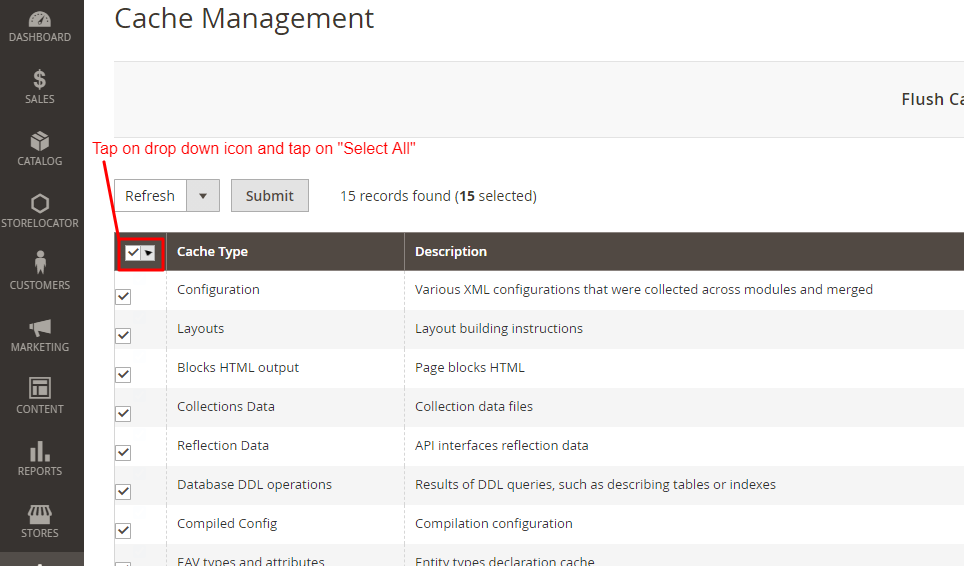
              Step 1: Head to

              System -> Cache Management 

              Step 2: Here, You will have to tap on “select all” cache types in order to enable all. 

              Cache Management

              Step 3: Tap on drop down and select “Enable”.

              Cache Management

              Step 4: And Hit “Submit”

              Cache Management

              When all cache types are enabled, you’ll start to notice that pages you visit will be cached into the system. So, the second time you visit, the page will load faster. 

              Note: Apply for both front end and back end. 

              #3 Enable Flat Catalog Category and Product

              Enabling flat category and product is a form of database caching, which will result in faster loading of information on the front end of your Magento 2 website. It gets almost all necessary attributes from various tables into your store database, and merges them into one easily accessible file. Here, you can choose which attributes will get merged into your flat catalog by adjusting your categories and products. 

              To Enable flat category and product follow these steps: 

              Step 1: Head to

              Store-> Configuration

              Step 2: In “Configuration” section, open Catalog and again open the Catalog option inside it. 

              Configuration

              Step 3: Open “Storefront” option in Catalog section

              Catalog

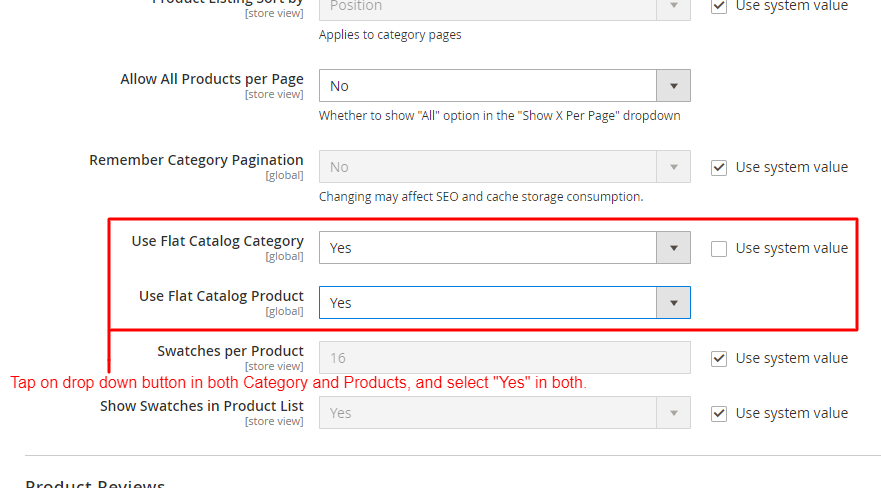
              Step 4: In Storefront, scroll down to “Use Flat Catalog Category” & “Use Flat Catalog Product”. If it is not enabled, then turn them to “Yes” in both categories. 

              Catalog

              Step 5: Once both catalog category and product is in enable mode. Go to “Store” again and tap on “Product”.

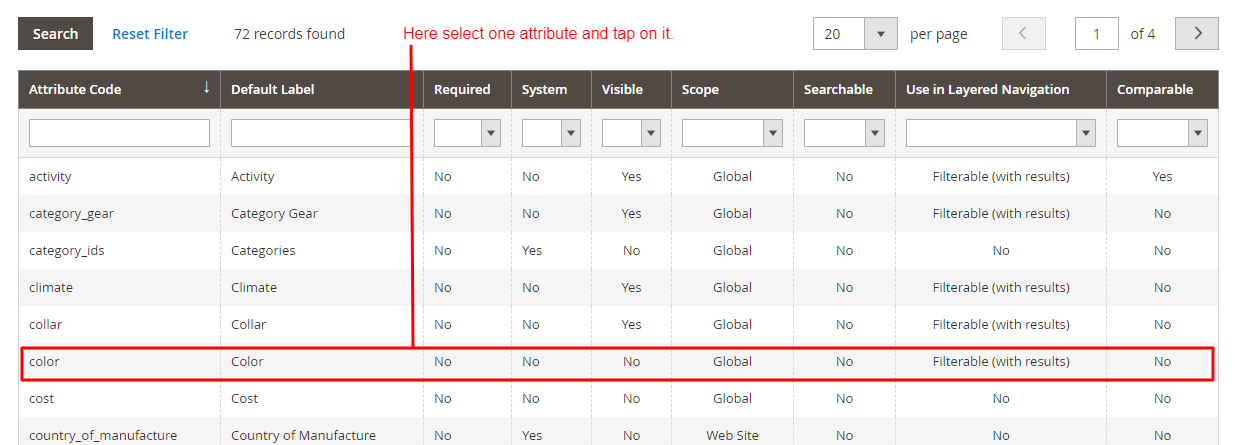
              Step 6: Once you open the “Product” category, you’ll have to select one attribute. Here, we choose the “Color” attribute. 

              Attribute Code

              Step 7: In the “Attribute information” section, open “Storefront properties”

              Attribute Information

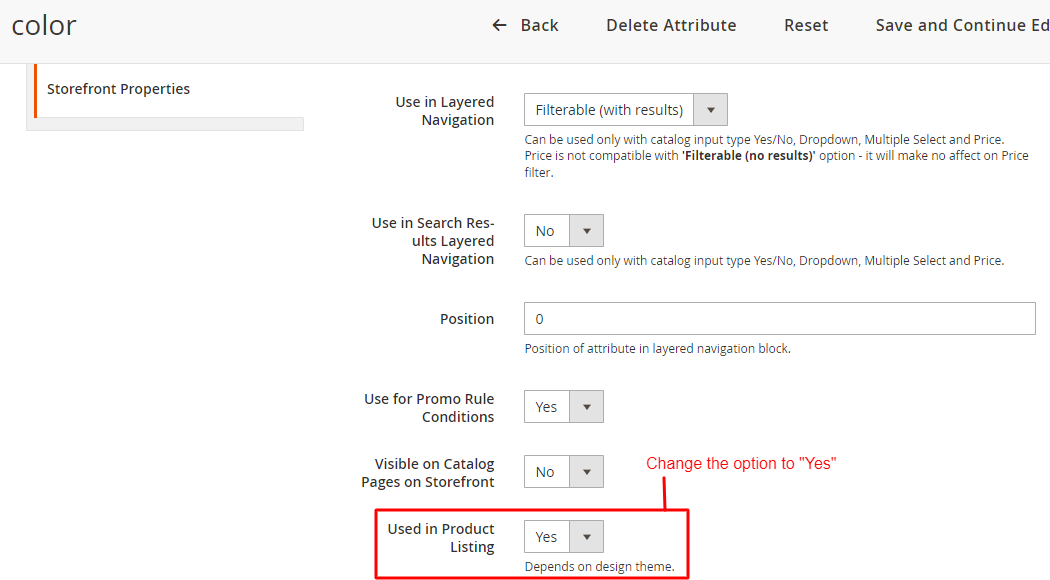
              Step 8: In “Storefront Properties”, Scroll to “Used in Product Listing” and enable it. 

              Color

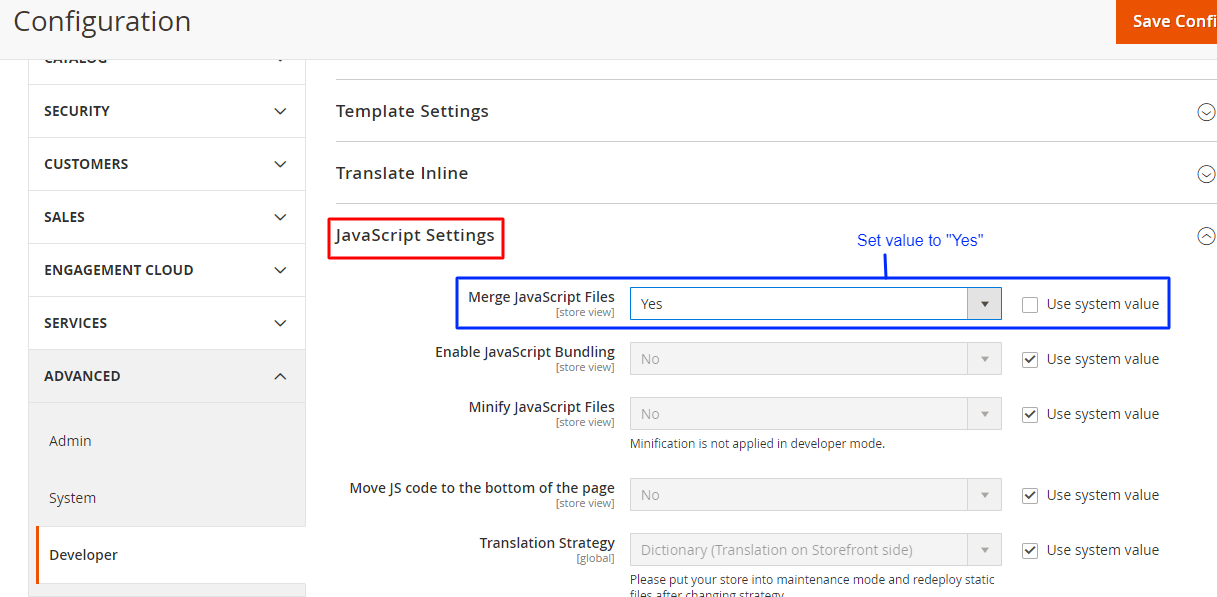
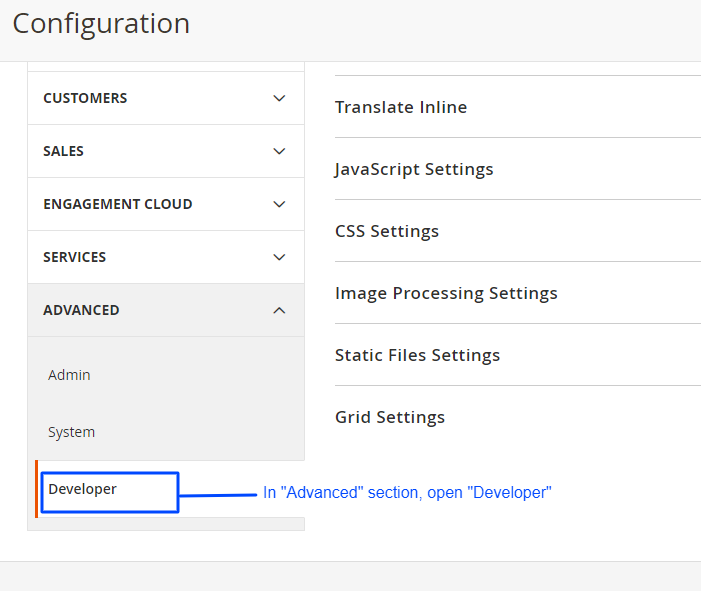
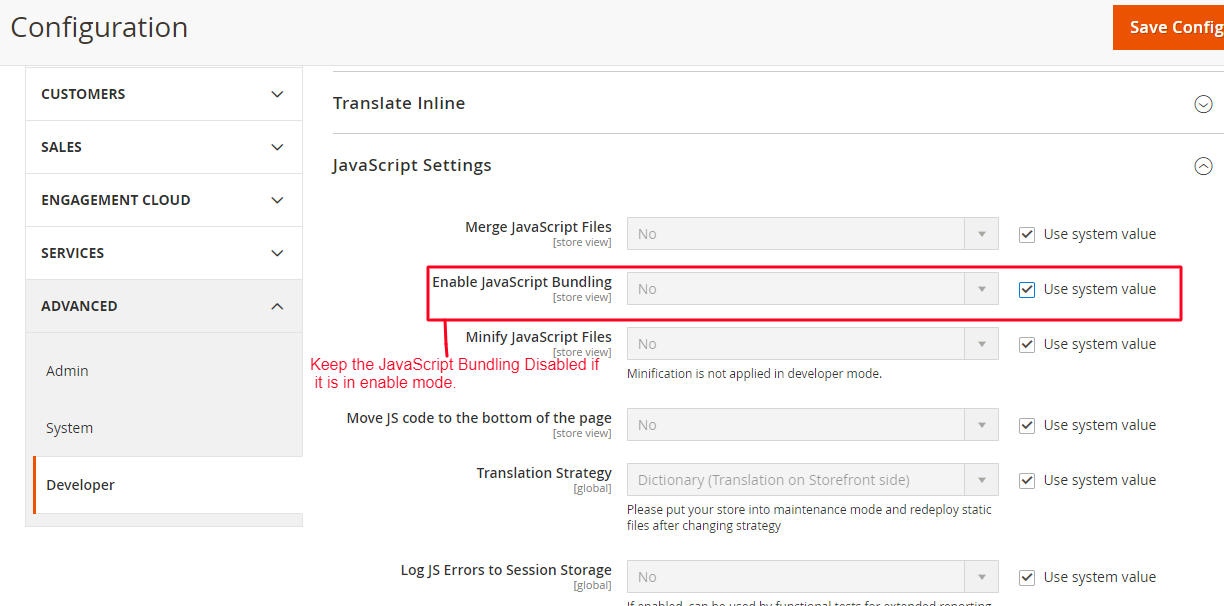
              #4 Disable JavaScript Bundling 

              Purpose of the setting is to optimize Magento 2 site speed by bundling groups of JavaScript files together, this will limit the number of requests that a web browser has to make to the server.

              However, micromanaging what files are bundles can be quite difficult. This can result in a buggy experience on the front end and all the JavaScript files can result in being larger than they need to be. 

              Remember to keep your JavaScript Enable.

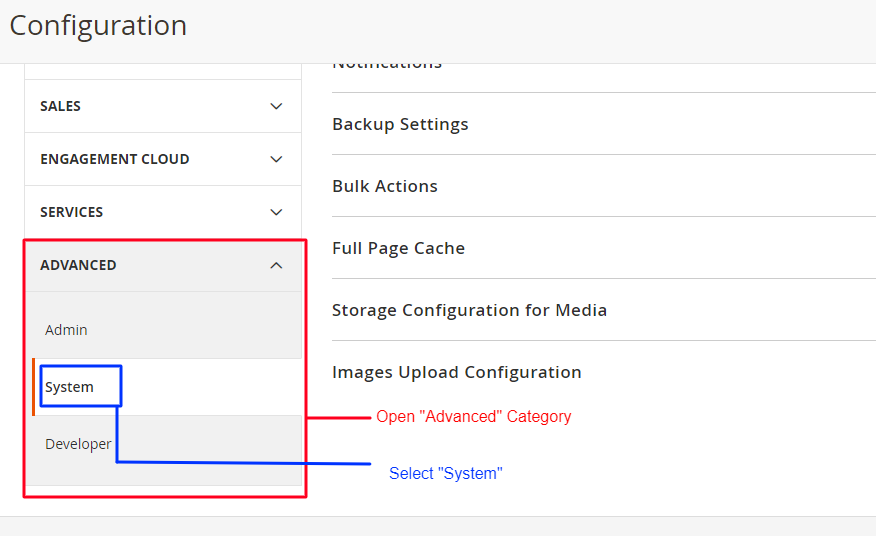
              Step 1: Head to 

              Store-> Configuration

              Step 2: In the Configuration section, scroll down to the “Advanced” tab on the left panel, and in that, open “Developer” section.

              Configuration

              Step 3: In the Developer section, open “JavaScript Settings” and go to “Enable JavaScript Bundling” option. You have to keep it disabled the entire time. 

              Configuration Advance

              #5 Keep up with Magneto Updates

              Things like old-bugs and optimization opportunities gets in highlight with the release of more patches of updates. With the release of more patches, For that you will have to keep your Magento website functionality updated. Want to know how to check it?

              Step 1: Head to 

              System-> Web Setup Wizard

              Step 2: In Web Setup Wizard, Update your Magento store by tapping on “System Upgrade”

              Web Setup Wizard

              #6 Keep 3rd Party Extensions Updated

              Not updating 3rd party Magento 2 extensions can cause many problems with your Magento 2 website functionality. Thus, keeping it updated can help you enhance your Magento 2 site speed. 

              To update 3rd party extensions in your Magento 2 store, follow these steps:

              Step 1: Head to 

              System -> Web Setup Wizard

              Step 2: Select “Extension Management”.

              Setup Wizard

              Step 3: Action -> Update

              #7 Remove Unused Magento 2 Extension 

              With the time, your website will grow, and then the time will come when you’ll realise that some of the extensions are not the best-fit where some of them will forfeit their functionality. That is the time when you have to remove those unused Magento 2 Extension.

              Step 1: Head to, 

              System -> Web Setup Wizard 

              Step 2: In Web Setup Wizard, tap on “Module Manager” 

              Setup Wizard

              Step 3: Go to the Module Manager and there you’ll see each and every module of Magento. With every module, there is an Action button from where you can disable the module that is not important for you. 

              Module Manager

              #8 Schedule Indexing

              There are good amount of chances that your indexes modes will be set to update on save. This will work best if you have a few hundred products on your website, but if you have a few thousand products, then you might find your Magento store a little sluggish after you make changes to your categories and products. 


              In your Magento 2 store, it is much more efficient to change the modes to update by schedule. By this, you can schedule indexing to take place on various intervals during the day, which also helps reduce bottlenecking. The only downside you’ll face will be; until the index takes place ,your changes will now display on the front end until the index has taken place. 

              Now, how to schedule indexing? 

              Follow these steps:

              Step 1: Head to 

              System-> Index Management

              Step 2: Select the indexes and select “Update by Schedule” 

              Index Management

              Moreover, It is not necessary to update by schedule but, If you do decide to change this to update by schedule, then you can amend this schedule by:

              Step 3: Head to 

              Stores-> Configuration 

              Step 4: In Configuration section, open Advanced tab on left panel, and in that open “System” option. 

              Configuration System

              Step 5: As you selected “Update by schedule” in Index Management. You’ll be able to see the accessible option to change the time and schedule index according to your time. 

              Configuration for group index

               #9 Disable All Debug Logs

              Sometimes you can find debug logs as a very heavy resource on your Magento 2 store. These types are just vlogs, that tend to write large files to your system that aren’t necessary. Your final results may differ between seeing no difference to seeing a little difference in store optimization.

              Debugs logs are normally off by default, it’s always worth checking to check your setup from time to time. 

              To check your setup go to: 

              Step 1: Head to

              Store-> Configuration

              Step 2: Open “Advanced” in the left tab,in that, open “Developer”.

              Configuration

              Step 3: Set “No” in log to file. If not then make sure to select “No”.

              Configuration

              #10 Merge JS And CSS File 

              Unmerged Javascript and CSS are one of the main reasons that causes high loading time in your Magento 2 eCommerce store. Here, Eliminate redundant or unnecessary data with this process. And after merging these files, it cannot be modified.

              Reduction in the number of requests to the server due to merging of JavaScript and CSS will ultimately give better results in loading time of the store. 

              Follow these steps to Merge JavaScript and CSS files:

              Step 1: Head to 

              Store-> Settings-> Configuration

              Step 2: On left panel, expand the “Advanced” tab, in that select “Developer” option 

              Step 3: Expand CSS Settings, now in “Merge CSS File” set “Yes”

              Configuration

              Step 4: In the Developer section, open “JavaScript Settings”. In that, set the “Yes” in “Merge JavaScript Files”.

              Configuration

              Step 5: Save Configuration!

              Takeaway

              Magento 2 is very vast, there are numerous ways to speed up your Magento 2 site. Here, the choice is yours! Choose the ways that are most suitable for your Magento 2 site. All you need to remember is: Faster and nicely optimized your personal site development environment is, faster your eCommerce Magento store will be in competition. 

              The above mentioned tips will help you increase Magento 2 site speed. Well, it is true that a well optimized Magento eCommerce store provides a faster and overwhelming browsing experience to its users. Therefore, with these tips, experience the best engagement rate and conversion rate. 

              For more tips, check out our article on Magento Speed Optimization. Also, check out some of the most astonishing eCommerce trends in 2021. All you need is to go with the trend and make your website powerful as much as you can. 

              Ciao!

              How Magento B2B E-commerce/Marketplace Solution can help to boost your profit?

              B2B business model has always been the most preferred mode of business for the manufacturers, wholesalers, stockist etc. as the total B2B Sales is expected to reach $9.4 T by the end of 2020 in US. There are possible reasons behind, why the B2B business has such a high growth rate compared to B2C? The answer could be that retailers are getting the products with better margins so their profit increases by selling to an end customer, as a manufacturer/wholesaler or stockist they can buy and sell in high volume so profit is big.

              B2B Marketplace Eco-system:

              If we talk about the B2B Eco-system it is divided into three stages Production, Distribution and Consumption having a specific channel sales network i.e. Manufacturer >Distributor (Online/Offline) >Wholesaler/Stockist >Retailer > End Consumer. In this arrangement everyone at every stage is putting their mark-ups so
              retailers’ profit is shrunken as he’s the one who’s facing the end consumer and it becomes difficult for them to sustain against online e-commerce players.

              To enhance competitiveness, businesses should consider leveraging technology and expertise. Hiring Magento developers can provide the necessary support to optimize online platforms, streamline operations, and improve the overall customer experience, allowing retailers to better position themselves in the market.

              Nowadays after B2B eCommerce been introduced the middle distribution channel is been modified. There are multiple business possibilities in this arrangement i.e. 1. manufactures can have an online portal in place with call to price option or pre-defined prices for distributor, wholesaler or retailers 2. Manufacturer can directly sale to retailer by removing any middle sales channel network by offering the better prices. (In this arrangement manufacturer will be aware of end customer’s behaviour and requirements which in traditional way was very difficult).

              What sort of products are being or could possibly be sold on B2B e-commerce store? Mostly the B2B business is for industrial products i.e. machineries, electronic capacitor etc. for which one needs to hire an efficient and large in number team of Sales reps whose job is to meet the B2B Customer explain them about everything related to the product and convince them to buy. This requires to put a lot much efforts and money so overall a very costly option. Now let’s put another option of having an online B2B eCommerce portal in place which in first place connects you to the whole world by allowing you to expect business from anywhere without investing a hell lot of money. In this arrangement B2B buyers are going to explore and experience each and every detail related to the heavy machinery or similar product as they don’t need to touch and feel the product what we generally do with consumer goods. Here I didn’t mean to say that the sales reps should or could be replaced but definitely their roles and responsibilities will be changed and enhanced.

              What’s the need of B2B Marketplace?

              Now other side of the business which is consumer related products such as stationary, clothing, fashion etc. Based on a research made in USA more than 90% B2B buyers said that they used online portals to buy things related to their work. So, as a result the offline companies who used to run the direct business are now struggling to compete with the larger companies so as the result either they merge with the large enterprise or shutdown their business. So, for the large companies its mercy killing and for the small companies its easiest way to get out. What do you think what possible might have
              gone wrong that the small player had to undergo such situation?? The answer is non-acceptance of technology as they were happy doing the business with traditional way, wherein the other company came with an idea, gave the customer ease of use and took the business. So, having a B2B e-commerce or Marketplace is going to help you not only to survive but sustain within the cut-throat business situation.

              Take another example of Auto-parts business which was once a purely B2B Driven business but as large players noticed that the manufactures are not updating themselves with latest technology, they got the benefit of the situation and as a result the total B2B Sales of the auto-parts business community got drastically dropped. So, now most of the companies understood the need of the time and started expanding and acquiring the latest technology by creating their own B2B e-commerce or B2B Marketplace to be in the race or possibly to win it.

              For more details about Magento B2B eCommerce portal you can follow this video placed on Magento website – https://magento.com/resources/making-b2b-ecommerce-work-you or else do ask me and shall try sharing more information on this subject by writing on biz@logicrays.com

              site-loader